AI Website Design: Why Hours of Prompts Never Felt Like Me
AI website design is good now. Good enough that I spent hours this summer writing careful, hand-picked prompts for a new jacobwonder.com, and got back five polished homepages in return. Every one of them was well built. Not one of them felt like me.
The design you’re reading this on came from closing the laptop and sketching out some text ideas on paper. That direction now runs this site and Snazzy Sites, the platform my team and our agency partners use to look after client websites. And it’s flexible enough that you can redesign this page yourself further down.
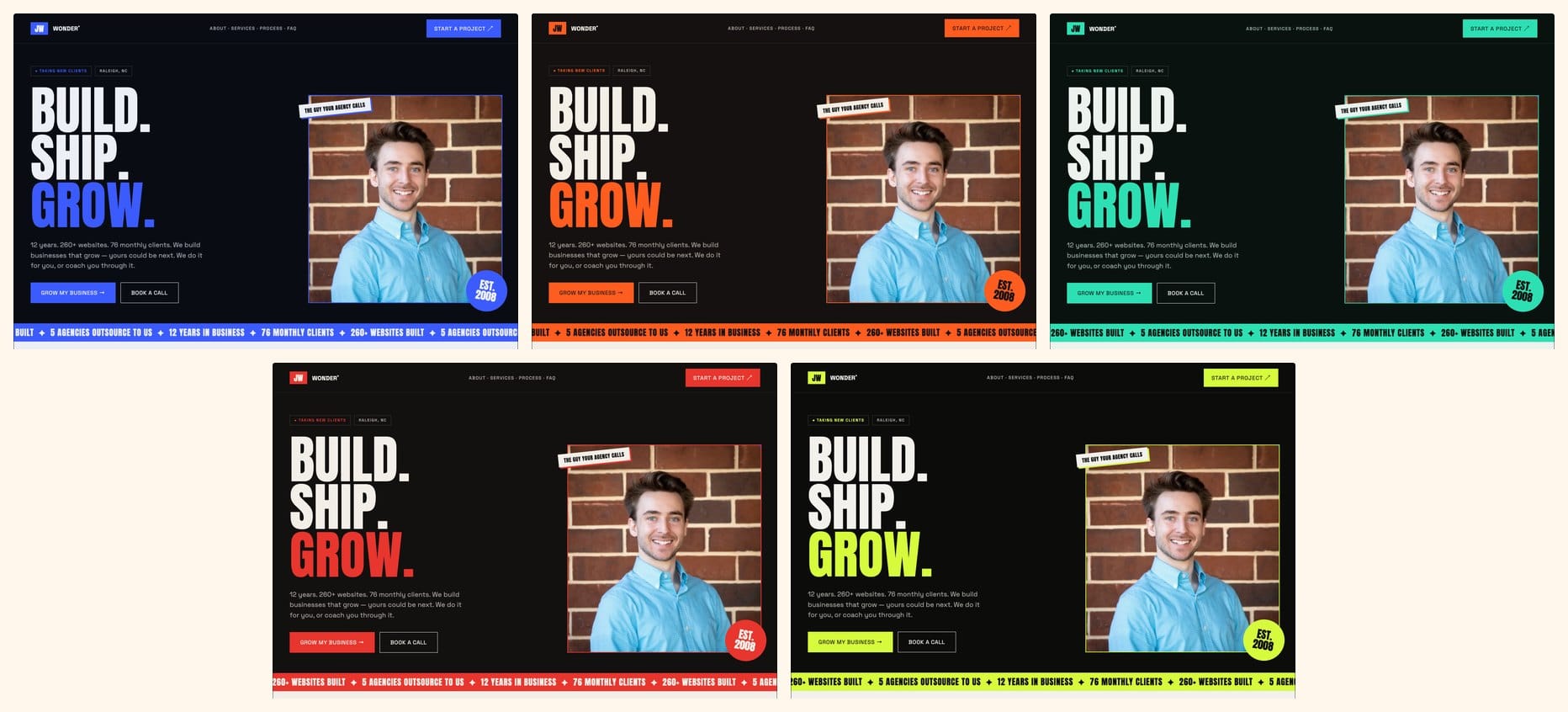
The five directions the AI gave us. Same headline, same photo, same layout. Only the color changes.
Can AI design a website?
Yes. A good AI design tool turns a prompt into a complete, polished homepage in minutes. What it can’t hand you is the point of view that makes a site feel like yours.
The tool we used was Claude Design, which Anthropic launched in April 2026 for making designs, prototypes and slides by talking to Claude. I gave it everything a designer would ask for: my real numbers, my photos, who I work with, what I sell, the tone I wanted. I rewrote prompts, compared versions, and pushed on the details.
The output was genuinely impressive. Full homepages with a navigation bar, a big headline, a scrolling ticker of stats, a story section, services, a process, testimonials. Things that used to take a designer days showed up in minutes. If you need a clean, professional homepage and you don’t care much what it says about you, AI website design is already there.
I cared what it said about me, and that’s where it fell short.
What did AI website design give us?
Five versions of one homepage. The tool’s own note said it plainly: same design, four palettes, with only the color changing. We even marked one as the approved direction.
Look at the screenshot above. Every direction has the same three-word headline stacked in tall, condensed capitals. The same photo of me with a sticker on the corner. The same ticker of stats running across the page. The same two buttons. Then the colors change: electric blue, orange, mint, red, and black with acid lime. That last one was labeled “Approved direction” in the file, and for a while I thought it was the one.
It wasn’t wrong. It was loud and confident. But when I imagined a business owner landing on it, it read like a bold agency template with my name dropped in. It could have been anyone’s website. That’s the thing I couldn’t prompt my way out of, no matter how many hours I put in.
Why do AI website designs feel generic?
AI builds the most likely good-looking answer to your prompt. Likely is the opposite of personal, so the results drift toward the middle of everything that already exists.
Researchers have seen the same thing. When the Nielsen Norman Group tested AI prototyping tools, it found that without detailed visual specifications the tools tend to output designs that share a similar, generic look, because AI systems favor common patterns from their training data. When nobody specifies a style, they default to neutral, minimal designs that lack visual identity and emotion.
The same study found that more specific prompts produce much better results, and that matches what I saw. My detailed prompts got much closer than a one-liner would have. But specific facts aren’t the same as a point of view. I could tell the tool everything true about my business, and it would still make the safest, most familiar version of it.
What made the final design feel like me?
I stopped prompting and sketched text ideas on paper. Starting from the words in my own voice gave the design a direction that no prompt had produced.
Paper doesn’t autocomplete. Nothing on a blank page suggests the most likely next move, so the only ideas there are your own. Once I had the words in front of me, I could see the feeling I wanted: plain-spoken and a little playful, warm, and loud where it mattered.
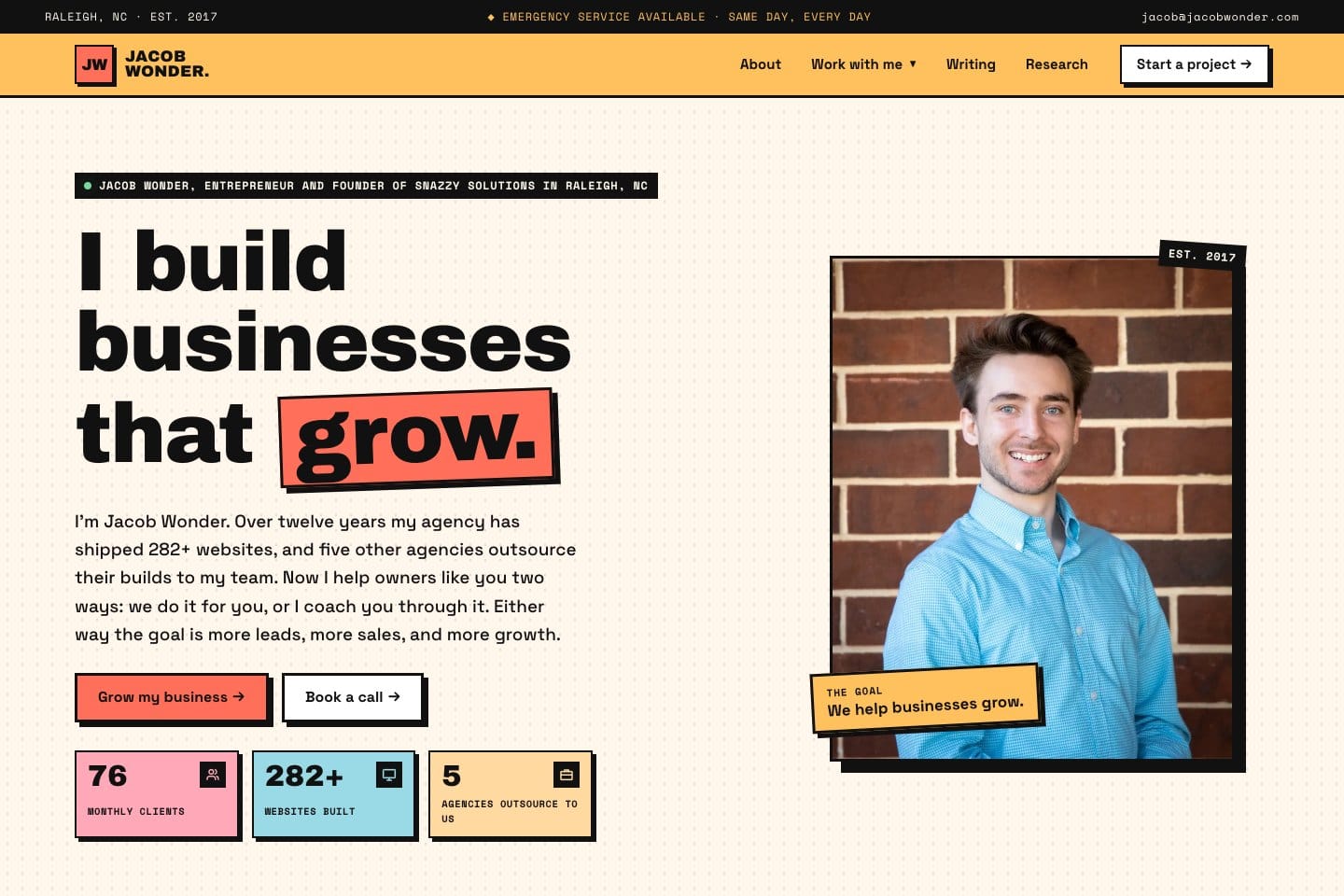
Then I went back into the same AI tool and built it. Same tool, completely different result, because this time I was bringing the direction and the AI was doing the building. I put the design together in Claude Design on the morning of October 2, 2026, and it went live on this site that same day. Here’s where it landed:
The direction we landed on, live on jacobwonder.com.
A few choices make it feel like mine. The headline is a full sentence in my own words, with one word stamped on like a sticker. Every card has a thick ink outline and a hard shadow, the way you’d draw a box with a marker. Small labels are set in a typewriter-style font, like notes in a margin. The colors are warm sunset tones on a dotted paper background. None of those choices is rare on its own. Together, they sound like me talking.
Can one design work for two very different websites?
Yes. The same design runs my personal site and Snazzy Sites, the platform my team uses to run client websites. Only the colors and a few settings change.
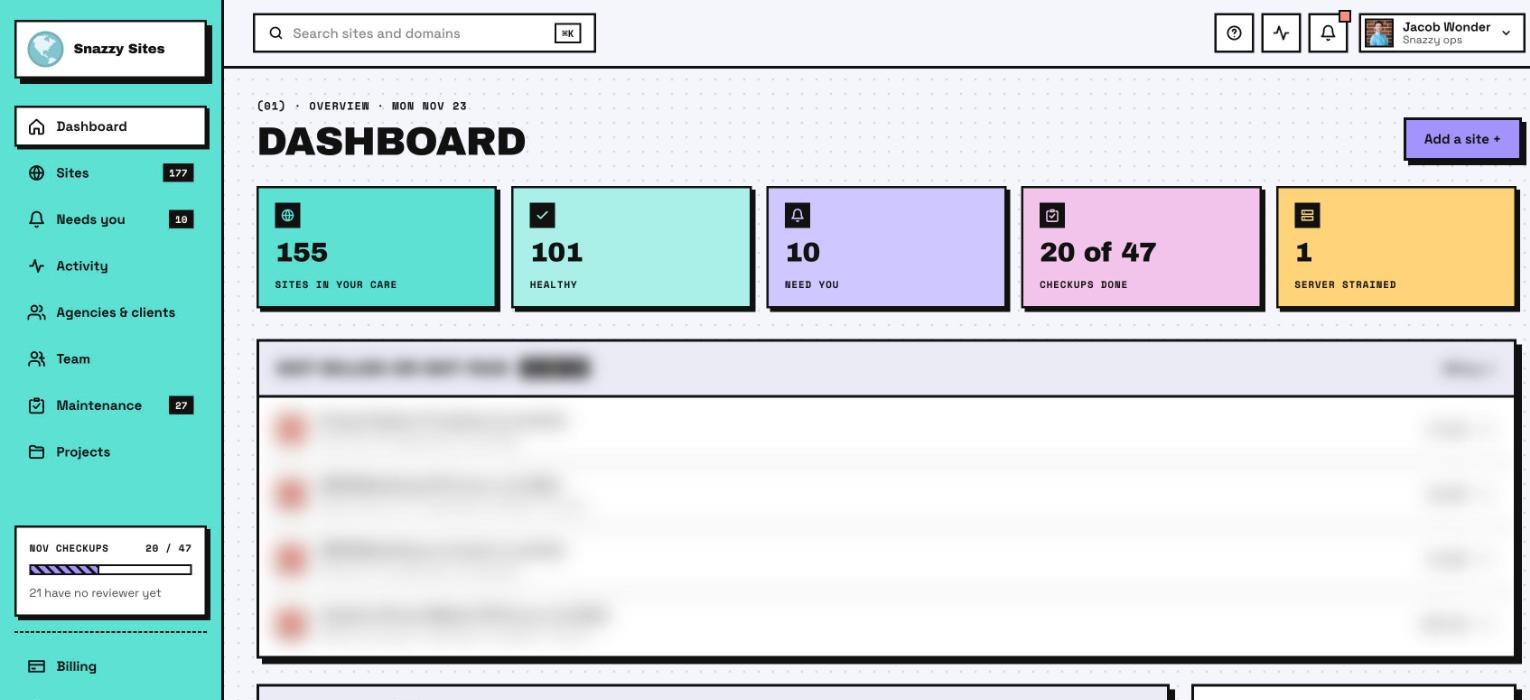
Snazzy Sites is where my team keeps track of every website we look after: whether each one is healthy, what needs attention, monthly checkups, billing. It’s a working tool, and it uses the exact same look. Same outlines, same hard shadows, same typewriter labels, same dotted texture. The colors switch to Snazzy’s teal and violet.
The Snazzy Sites dashboard. Same design, Snazzy colors. Client details blurred.
Agencies that work with us use Snazzy Sites too, and each one sees it in their own brand colors. That’s the part I’m proudest of. A look that started as a sketch of how I talk turned out to be a system that can wear somebody else’s brand without falling apart.
How customizable is the design?
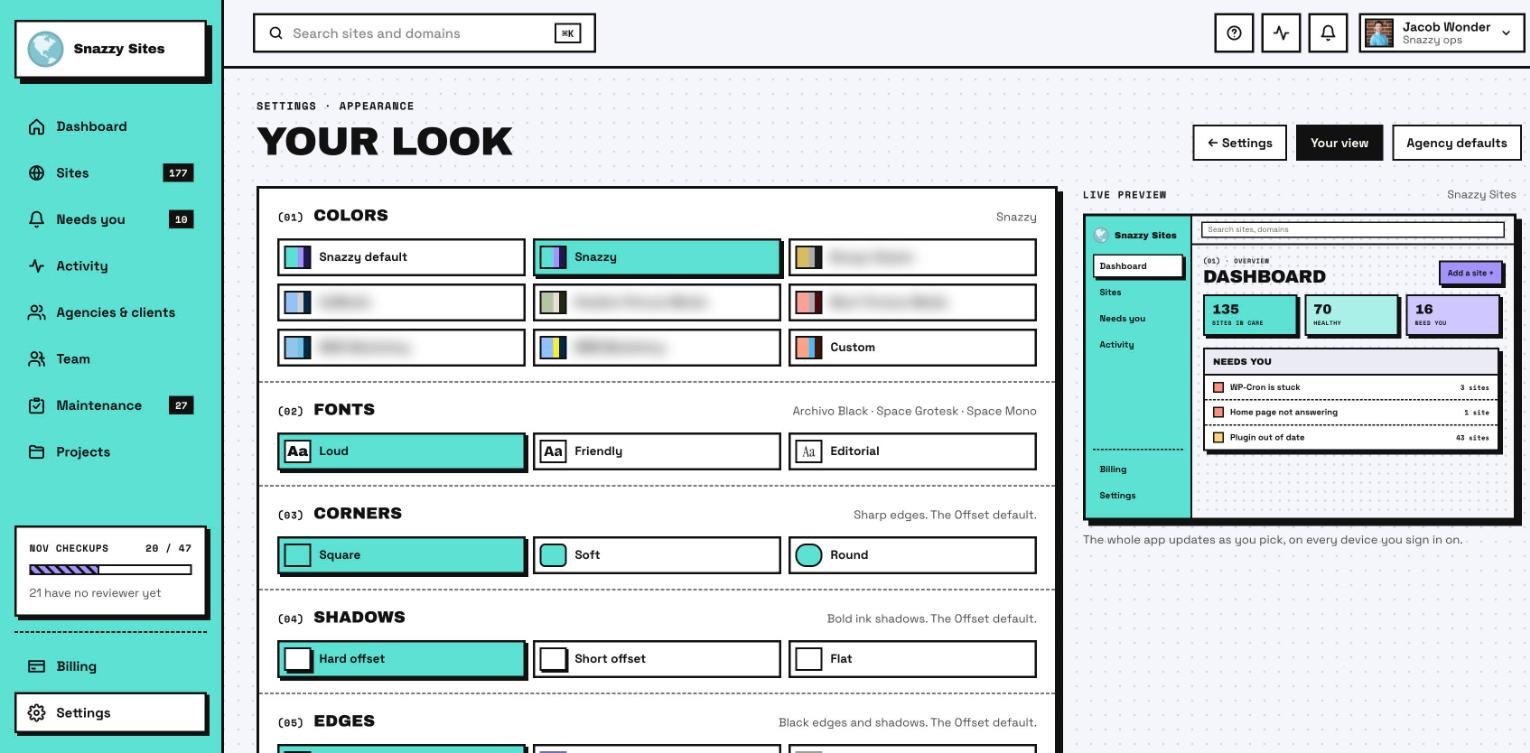
Very. Six choices restyle everything: colors, fonts, corners, shadows, edges and texture. Try them on the small copy of my homepage below.
This is the same designer that lives in Snazzy Sites under Settings, Appearance. There, every pick repaints the whole app for that person, on every device they sign in on.
The designer inside Snazzy Sites. Agency names blurred.
Here’s a working version of it. Pick a color scheme, swap the fonts, round the corners, flatten the shadows. Choose Custom and give it any two colors you like.
Redesign this pageLIVE DESIGNER
Live preview1 of 972 looks
RALEIGH, NC · EST. 2017◆ SAME DAY, EVERY DAY
JWJACOB WONDER.About · Work with me · WritingStart a project →
ENTREPRENEUR · RALEIGH, NC
I build businesses that grow.
Websites, marketing and advice for owners who want more leads, more sales and more growth.
Grow my business →Book a call →
76Monthly clients282+Websites built5Agencies
Most sites launch in 0 to 2 months.
Book the call →
Every pick restyles the whole page. On Snazzy Sites, the same six choices restyle the entire app.
With four color schemes and three options for each of the other five settings, that’s 972 different looks before you touch the custom colors. With Custom, you choose a main color and an accent, and the design works out the rest of the palette: lighter fills for the cards, a soft page background, a deep color for the dark band. Each fill is set to a lightness that keeps black text readable, using the OKLCH color model, so even a loud brand color stays legible. That’s how an agency with a gold logo and one with a navy logo both end up with a dashboard that looks like theirs.
The AI directions were five fixed pictures. This is one idea with a lot of room to move.
How should you use AI to design a website?
Bring the direction yourself, then let AI do the building. Decide your words, your tone and one strong idea first. Use AI to explore, produce and polish it quickly.
Here’s the order I’d follow now, after doing it the hard way:
Write the words first: your headline, how you’d describe what you do to a friend, the phrases you actually use. On paper if you can. The words set the tone, and the look grows out of them.
Pick one strong idea before you open the tool, so the AI has a direction to follow.
Give it real content: real numbers, real photos, real testimonials. AI fills gaps with the most generic option it can find, so leave as few gaps as you can.
Ask for different structures. If every option has the same layout, you’re comparing paint. Ask for directions that differ in layout, type and tone.
Judge each option by one question: does this sound like me? Polish is easy to get now. Fit is the hard part.
Have people finish the job. A design is the start. Speed, accessibility, forms, search setup and upkeep still need a team that checks every detail. My team wrote about where AI website development works and where it doesn’t.
My team works this way on client sites now. People decide the direction and sign off on every page. AI is a tool they use to get there faster.
Is web design still worth it in 2026?
Yes, and AI makes the human part matter more. When anyone can generate a decent homepage in minutes, the difference is taste, real content and a site that keeps working.
A generated homepage is a picture of a website. A business needs a website that loads fast, shows up in search, sends leads to the right inbox, and still works after the next plugin update. Most of that happens after launch, which is why I wrote a whole paper on what goes wrong once small-business websites go live.
On the search side, Google has said it judges content on its quality, not on how it was made. Its guidance on AI-generated content says using AI doesn’t give content any special gains, and that what does well is useful, helpful and original. The same goes for design. What matters is whether the site says something real about your business.
If you want a site that feels like yours, my team builds them, and most of our sites launch in 0 to 2 months. Book a call and tell me what you’d write on the paper.
AI website design FAQ
What is the best AI for website design?
The one we used, and still use, is Claude Design. It made complete, polished homepages from a prompt. The best tool matters less than the direction you bring to it.
Can AI design a whole website for me?
It can design the pages. You still need someone to decide what the site should say, build it properly, connect forms and search, and keep it working after launch.
Will AI replace web designers?
Not the good ones. AI makes layouts fast and cheap, which makes the human parts worth more: knowing the business, choosing a direction, and checking every detail before it goes live.
Does an AI-designed website hurt SEO?
No. Google judges pages on quality, not on how they were made. A site ranks when it’s fast, useful and clearly about your business, whoever or whatever designed it.
How long did this redesign take?
The AI directions came from hours of prompting over the summer. Once I had my own direction on paper, I built the final design in a morning and it went live the same day.
Can I get a custom design like this for my business?
Yes. My team designs and builds custom websites that start from how you talk about your business. Book a call and we’ll start there.
How Long Does It Take to Build a Website? Most of Ours Launch in 0 to 2 Months
How long does it take to build a website? Most sites my team builds launch in 0 to 2 months. Before writing this I checked that line against our own project dates. Of 15 new sites and rebuilds we started since January 2025 and have launched, 11 were live within two months of the start, and the typical one took 39 days.
I’ve been building websites since 2008, my team has built more than 282 of them, and five agencies send us their clients’ sites to build. So I have a lot of start dates and launch dates to look at, and they say the same thing I tell owners on a first call: the building is the quick part. Most of the rest of the calendar goes to things only you can give us.
How long does it take to build a website?
Most websites my team builds launch in 0 to 2 months. Of 15 we started since 2025 and launched, 11 were live within two months of the start.
Those 15 are new websites and 1:1 rebuilds, meaning the same site rebuilt clean or moved to a new platform. Counted from the deposit (or the kickoff, when there was no deposit) to the day the site went live:
11 of the 15 launched within two months (60 days).
The typical project took 39 days, a little under six weeks. That is the median, the middle one when you line all 15 up from fastest to slowest.
The fastest was a clean 1:1 rebuild that went live 7 days after kickoff.
The 9 brand new builds ran a little longer than the rebuilds. 5 of the 9 launched within two months, and the middle one took 51 days, about seven weeks.
Start to launch
Sites (of 15)
30 days or less
5
31 to 60 days
6
More than 60 days
4
A note on how I counted, so you can judge the numbers for yourself. They cover new sites and rebuilds we started since January 2025 that have launched. The clock starts when the deposit is paid, or at kickoff when there was no deposit, and stops at go-live. Where nobody logged a go-live date, I used the date of the final payment, because I bill the balance when a site goes live.
Redesigns are not in these numbers. Giving an existing site a new design is a different job with its own timeline, and my team’s website redesign guide covers how those run.
For comparison, Wix’s guide to the same question puts a build by professional developers at 2 to 5 months, and says building a website in general can take from around one to six months.
Why do some websites launch in a week while others take two months?
The building itself is usually the short part. The calendar mostly follows how ready the content is and how fast decisions and approvals come back.
Two of our fastest launches show how short the hands-on work can be. One was the clean 1:1 rebuild I mentioned: same design, same content, rebuilt from scratch and live in 7 days. The other was a one-page site that went live in 15 days. Building it took about a day. The rest of those two weeks went to search setup, forms and email, and waiting on the domain switch.
Design moves quickly too. On 10 projects where I have both dates, the first homepage design came back between 1 and 7 days after the brief, and the median was 3.5 days. AI design tools can produce a homepage faster than that, but I learned on my own site that AI website design is quick to look polished and slow to feel like you.
So when a project takes the full two months, in my experience the extra weeks usually go to things only the business can supply: the words, the photos, the answers to questions and the final yes. That is normal. You have a business to run, and your website is one of forty things on your list. It does mean you have more control over your launch date than you might think.
How long does each phase of a website build take?
Kickoff and a first homepage design take days. Content, review rounds and launch setup take as long as the people involved need, and that is where a timeline stretches.
Phase
How long
Kickoff and brief: the pages, the goal of the site and examples you like
A call and a written brief
Homepage design
1 to 7 days after the brief on our projects (median 3.5)
Content: the words and photos for every page
The widest range of any phase
Inner pages, built from the approved homepage
Days for a one-page site or a 1:1 rebuild, longer as pages and features are added
Review and changes
As fast as feedback comes back
Launch: domain, DNS, email, forms, redirects and tracking
Short when the logins are on hand
Kickoff is where the page list gets decided, and a settled page list protects everything after it. A page added in week five means new design work, new copy and another round of review.
We design the homepage first because it carries most of the decisions: fonts, colors, buttons, the way sections stack on a phone. Once you’ve approved it, the inner pages reuse those pieces, so they go faster and need fewer opinions.
Content is the phase nobody can do for you entirely. A writer can draft the copy, but someone at the business still has to supply the facts and approve the result. Photos are the same. Stock photos are quick, and real photos of your team and your work are worth the wait, so the shoot needs a date early.
Launch looks like a single day from the outside. Behind it is a checklist: point the domain at the new site, move or protect the email, test every form, set up redirects and turn on tracking. The domain step has a wait built in that nobody controls. GoDaddy’s help page says DNS changes usually spread within a few hours but can take up to 48 hours to reach everyone.
What actually delays a website launch?
Mostly things outside the build: photos, written content, a decision or final sign-off, access to the domain, or a third-party account that isn’t approved yet.
Four of our 15 took longer than two months. Across my project notes, the same five things come up whenever a launch is waiting.
Photos. Real pictures of the team, the location or the products usually mean booking a shoot, and an online store needs a photo of every product it sells.
Written content. Somebody has to say what the business does, who it serves and why a customer should pick it, and that somebody is busy running the business.
A decision or sign-off. A service gets renamed, the page list changes, or the one person who can approve the site is hard to reach and every answer gets relayed through someone else.
Domain and DNS access. The login for the domain sits with a former employee, a previous web company or an account nobody has opened in years. This one tends to surface in the last week.
Third-party setup. A payment processor has to approve the account, or a booking system has to be configured, before the site can take money or reservations. For restricted products, the processor reviews the website itself first, which shapes how to build a peptide website that gets approved.
Most of that list can be sorted out before the project starts, which is good news if you have a date to hit.
How long does it take to build a small business website?
Plan on 0 to 2 months for a typical small business website. A one-page site or a straight rebuild of an existing site can be live in a week or two.
The kind of site moves the number more than the kind of business does.
A one-page site or a 1:1 rebuild is the fastest, because the content already exists. Those are the 7-day and 15-day launches above.
A new multi-page site needs a design, new copy and photos. One we built for an agency partner’s client went live 51 days after the deposit.
An online store adds products, payments, shipping and tax settings. A Shopify store we built launched 33 days after kickoff.
If you only need to exist online by next month, say so at the start. A good builder can launch a small first version with the pages that sell, then add the rest after launch. That beats holding the whole site back for one unfinished page.
Timeline and price are tied together, since both come down to how much is custom and who supplies the content. I wrote up the price side in how much a small business website should cost.
How long does it take to build a WordPress website?
The same 0 to 2 months for most. Installing WordPress takes minutes. The time goes into design, content and review, the same as on any other platform.
My numbers are WordPress numbers in practice. 14 of the 15 sites run on WordPress, two of them as online stores on WooCommerce. The other one is the Shopify store.
What changes a WordPress timeline is how much of the site is new. Rebuilding an existing design is quick. A custom design takes longer because every section gets drawn and approved. A store, a booking system or a member login each add setup and testing. Moving hundreds of pages from another platform adds a content check on every page.
If you run an agency and your own client is waiting on the answer, my post on white label web design covers how a build works when a partner does it under your name.
How long does it take to design a website?
Design is the fast part. On 10 of our projects, the first homepage design came back a median of 3.5 days after the brief.
The quickest came back the next day and the slowest took a week. That’s the first version of one page, which is the right amount of design to look at first. You’ll have opinions once you see it, and it’s cheaper to hear them before the other pages exist.
What stretches the design phase is the rounds of feedback after that first version. One person with clear notes can settle a homepage in a round or two. A committee where everyone comments separately takes much longer, and the notes often contradict each other.
If you’re sketching a website design timeline for your own project, give the homepage about a week, then block time on your own calendar to review it the day it arrives.
How can you get your website built faster?
Have your content, photos and logins ready before kickoff, name one person who approves things, and answer review requests within a day or two.
Write the content first, even as a rough draft. Bullet points about each service are enough for a writer or designer to work from.
Book the photo shoot the week you sign. Photographers have their own queue.
Name one decision-maker. Other people can weigh in, but one person gives the final yes.
Find your domain login now. Know where the domain is registered, who has the password and where your email is hosted.
Apply for third-party accounts early. Payment processors and booking systems run on their own schedule.
Approve the homepage before anyone builds the inner pages.
Pick a real date. A trade show, a busy season or a grand opening gives everyone a reason to answer quickly.
Have a launch date in mind? Book a call with me and I’ll tell you whether it’s realistic and what we’d need from you to hit it.
What should you ask a web designer about the timeline?
Ask when they can start, what they need from you and by when, how many review rounds are included, and who handles launch day.
The start date matters as much as the build time. A six-week build that begins in three months is a four-and-a-half-month wait, so ask where you’d sit in the queue.
Ask for the list of what they need from you, with dates. If a builder can’t tell you what they’re waiting on at each step, nobody is managing the calendar.
Then ask what happens at launch. Somebody has to move the domain, test the forms and check that email still works. Make sure that’s in the quote and has a name next to it.
Is a website finished when it launches?
No. Launch day starts the part most owners skip: checking forms and tracking, getting the pages into Google, and keeping the site working month after month.
A new site doesn’t appear in Google the day it goes live. Google’s own documentation says crawling can take anywhere from a few days to a few weeks, so submit your sitemap in Search Console on launch day and expect a short wait.
The first month is also when small problems show up on any new site, like a form that isn’t emailing the right inbox or a redirect that got missed. My post on website redesign SEO has the launch-day checks and a first-30-days list that apply to new sites too.
After that, a website needs someone looking at it. I wrote a research paper, The Post-Launch Gap, on what goes wrong with small business websites after they go live. Ask about care after launch in the same conversation as the timeline.
Website timeline FAQ
Can a website be built in a week?
Yes, if it’s a one-page site or a 1:1 rebuild and the content is ready. The fastest of the 15 sites in my numbers was a clean rebuild that went live in 7 days. A new multi-page site with fresh content takes longer.
How long does it take to make a website yourself?
With a website builder and a template, a simple site can be up in days if your text and photos are ready. The hours come out of your own week, and the writing is usually the slow part.
How long does a one-page website take?
A week or two when the content is ready. One we launched in 15 days needed about a day of building. The rest was forms, email and the domain switch.
How long does a website redesign take?
A redesign is a different job from a new build, because the old site’s pages, rankings and redirects have to carry over. It isn’t counted in the numbers on this page. My team’s website redesign guide covers the steps and the timing.
How much does it cost to build a website?
It depends on scope. Most small businesses pay $3,000 to $8,000 for a good custom website in 2026, plus a monthly care plan. I break the ranges down in how much a small business website should cost.
How long after launch does a new website show up on Google?
Google says crawling can take anywhere from a few days to a few weeks. Submit your sitemap in Search Console on launch day so Google knows the pages exist.
Is PHP Still Relevant in 2026? What 166 Live Websites Tell Me
Updated November 19, 2026: PHP 8.6 came out today, so the version notes and FAQ now include it. Usage numbers from W3Techs and WordPress.org were last refreshed on November 9.
Is PHP still relevant in 2026? Yes, and it isn’t close. PHP still runs most of the web, including WordPress, and it runs nearly every website my team hosts. I hear “isn’t PHP dead?” from developers starting out and from business owners who just got told their site needs a rebuild. October’s PHP2Shell security bugs, which led governments to pull websites offline, made the question loud again. Both groups deserve a straight answer, so this one uses real numbers: public usage data, plus the PHP versions on 166 live PHP sites my team manages.
I have been building websites since 2008 and have shipped more than 282 of them. Nearly all of them run on PHP. So I have a bias, and I’ll state it up front. What I can add is how the language looks on real small-business sites, measured on the servers we run.
Is PHP still relevant in 2026?
Yes. PHP runs about 69% of websites with a known server-side language, powers WordPress, and still ships a major release every year with active security support.
Relevance isn’t the same as trendiness. PHP isn’t what most new startups pick for a fresh app, and it hasn’t been for a while. But “relevant” means it matters to the web as it exists, and on that measure nothing else comes close. If you own a business website, there is a very good chance it runs on PHP right now. If you want work building websites for small businesses, PHP is still the language you will touch most.
For most people, the more useful thing to check is whether the PHP version under their site still gets security fixes. That is where I see real problems, and the numbers are below.
Is PHP still used in 2026?
Yes, on most of the web. About 69% of websites with a known server-side language use PHP, and WordPress, which is built in PHP, runs about 39% of all websites.
Those figures come from W3Techs’ PHP usage report, which on November 9, 2026 put PHP at 69.0% of sites with a known server-side language. Its WordPress report the same day showed WordPress on 39.4% of all websites and 58.1% of sites with a known content management system. WordPress is only one PHP project. Drupal, Joomla, Magento, Craft CMS and the Laravel framework are PHP too.
Developer surveys tell a different story, and that is where the “PHP is dead” idea comes from. In the 2025 Stack Overflow Developer Survey, 18.9% of all respondents said they used PHP, well behind JavaScript and Python. Both numbers are true. A minority of developers keep a majority of websites running, because one developer can build and look after dozens of small sites. The gap between what developers talk about and what the web runs on explains most of PHP’s reputation.
Is PHP dead in 2026?
No. PHP ships a new version every November and runs most websites. The “PHP is dead” idea comes from its old PHP 5 reputation and from what’s fashionable with developers.
Some of the criticism was fair. Early PHP let beginners mix database queries straight into HTML, function names were inconsistent, and a lot of insecure code got copied around the internet. Many developers formed their opinion of PHP then and never looked again.
The rest is attention. A language that runs millions of business websites in the background doesn’t make news. A new framework does. If you read developer forums, you’d think every site is a JavaScript app. Then you open the hosting panel for an actual dentist, plumber or law firm, and it’s WordPress on PHP almost every time.
There is also a career angle. Developers are paid more to work on new products at funded startups, and those teams mostly choose JavaScript, TypeScript, Python or Go. That is a fair reason to learn those languages. It says nothing about whether the sites the rest of the economy runs on are going away.
What PHP versions do real business websites run?
On 166 live PHP sites my team manages, most run PHP 8.3, a growing share run PHP 8.4, and the rest run PHP 8.2. All three versions get security fixes.
I pulled these numbers on October 23, 2026 from the two places these sites live: our own servers on xCloud (114 PHP sites) and the WP Engine accounts we manage for agency partners (52 installs). 162 of the 166 are WordPress. Three are Laravel apps and one is a custom PHP app.
Every one of those versions still gets security fixes from PHP. That is not the norm on the wider web, as the next section shows.
How many websites run an outdated PHP version?
About a third of WordPress sites run PHP 8.1 or older, versions that no longer get security fixes. About one in seven is still on PHP 7.4.
WordPress.org publishes the PHP versions reported by every WordPress site that checks in for updates. In its stats on November 9, 2026:
PHP version on WordPress sites
Share
Status
PHP 5.x and older
1.9%
Unsupported since 2018 or earlier
PHP 7.0 to 7.4
17.9%
Unsupported (7.4 ended November 28, 2022)
PHP 8.0 and 8.1
12.5%
Unsupported
PHP 8.2
22.6%
Supported until December 31, 2026
PHP 8.3 and newer
45.0%
Supported
Add the first three rows together and 32.3% of WordPress sites are on a PHP version that PHP itself has stopped patching. PHP 7.4 alone is 14.5% of all WordPress sites, almost four years after its last security release. And because PHP 8.2 drops out of support on December 31, 2026, about 55% of WordPress sites will be on unsupported PHP on January 1 unless their owners update.
The wider web looks the same. W3Techs shows 25.8% of PHP websites still on PHP 7 and 7.5% on PHP 5, so about a third of all PHP sites run a version with no security support.
None of that is PHP’s fault. Every one of those versions has a free, supported replacement. These are sites that were launched and then left alone, which is the same pattern I found when I studied what happens to small business websites after launch. A site with someone assigned to updates stays current. A site without one drifts until something breaks.
What changed in modern PHP?
Modern PHP is a different language from the one people mock. Versions 7 and 8 added real types, a JIT compiler, enums, readonly properties and property hooks.
The PHP 8.0 release added the JIT compiler, named arguments and union types. PHP 8.1 brought enumerations and readonly properties. PHP 8.4 added property hooks. A new version ships every November. PHP 8.5 came out on November 20, 2025, and PHP 8.6 arrived on schedule on November 19, 2026. It adds partial function application, a new Duration class for working with time spans, a clamp() function, and safer session settings out of the box: strict mode, HttpOnly cookies and SameSite=Lax are now on by default.
If you are wondering where PHP 6 went, there never was one. A PHP 6 was started in 2005 and abandoned in 2010, and in 2014 PHP’s developers voted to call the next major version PHP 7 so nobody would confuse it with the old books written about the abandoned one, as the naming proposal explains.
The ecosystem grew up too. Composer handles packages. Laravel and Symfony are serious frameworks used by large companies. Static analysis tools catch bugs before code ships. And the language has dedicated funding now: The PHP Foundation was set up in 2021 to pay core developers, and its founding members include Automattic (the company behind WordPress.com), JetBrains, Laravel, Symfony and Zend.
The funding matters more to me than any single feature. A language with paid maintainers, a yearly release cycle and published support dates is being looked after like infrastructure, which is what it has become.
Is PHP secure enough for a business website?
Yes, on a supported version that gets updated. Most PHP security problems come from old versions and abandoned plugins, not from the language itself.
PHP publishes security fixes for every supported version, and each version gets them until the end date on its supported versions page. The risk sits with the sites that never take them. Going by the WordPress.org numbers above, that is about a third of all WordPress sites. Outside WordPress it looks worse. Qualys counted 156 million PHP installations with a known version across its customers, and 110 million of them (71%) run end-of-life versions, 5.4 through 8.1. Old, unpatched versions are what make a PHP site unsafe, and the same is true of any language.
Does PHP2Shell mean PHP is dead?
No. PHP2Shell was serious, but PHP patched every supported version within a day. The sites left at risk were the ones on old PHP versions that nobody updates.
On October 20, 2026, PHP’s security team warned of two critical flaws, CVE-2026-109618 and CVE-2026-109619, both rated 9.2 out of 10. Together they let an attacker run code on an unpatched server without logging in. Fixes shipped on October 21 in PHP 8.5.12, 8.4.27, 8.3.36 and 8.2.35, according to PHP’s security advisory. The Record reported that researchers at the security firm Calif found the bugs about two months earlier with OpenAI’s tools.
The headlines came from what happened next. Governments and companies took websites offline as a precaution while they patched. On October 22, Baroness Lloyd told the House of Lords that 32 UK government services were unavailable and four more were partly down, The Register reported. Sites in Germany, France, Belgium, Finland and the Netherlands went dark too.
Attacks followed within days. On October 24, a security researcher’s decoy servers running an unpatched PHP 8.4.26 recorded 35 successful PHP2Shell attacks, according to his report, which BleepingComputer called the first confirmed exploitation in the wild. On October 26, the US Cybersecurity and Infrastructure Security Agency added both flaws to its catalog of vulnerabilities known to be exploited. The October 21 releases fix them.
I read the whole episode as a sign of how much depends on PHP. Nobody shuts down government services over a language that doesn’t matter. And the response was fast: PHP’s maintainers shipped fixes for four supported versions the day after their warning. The sites left exposed were the ones on PHP 8.1 and older. PHP no longer releases updates for those versions, so their owners had to wait on their Linux distribution or a paid support vendor, or upgrade.
On Wednesday, October 21, the day the fixes came out, my team updated more than 300 websites for our clients and agency partners. Every site in my data runs PHP 8.2, 8.3 or 8.4, and all three versions got the fix that day. None of them needed a rebuild, just an update. My team also wrote up what PHP2Shell means for WordPress sites if you want the details.
A third, smaller flaw is still waiting for a fix. On October 23, PHP published a notice about CVE-2026-115560, in its session upload progress feature. It only affects sites set up in an unusual way, so PHP will fix it in its next regular release instead of an emergency one. Until then, PHP’s advice is to switch that feature off, which is a one-line setting your host can change.
What is replacing PHP?
Nothing is replacing PHP on existing websites. For brand-new web apps, many teams choose JavaScript or TypeScript (Node.js, Next.js) or Python instead.
It helps to split the web into two kinds of projects. The first is the content and commerce website: a company’s site, a blog, a store, a booking page. That world still runs on WordPress, WooCommerce, Shopify and site builders, and the open-source part of it is mostly PHP. The second is the custom web application: a SaaS dashboard, a marketplace, an internal tool. That is where JavaScript and Python have taken a big share of new projects.
Even there, PHP holds its own. 8.9% of all respondents in the 2025 Stack Overflow survey said they used Laravel. Two of our own products are Laravel apps: the platform we use to run our clients’ sites and Snazzy Maps.
PHP vs Python for web development: which is better?
For websites, WordPress and hosting, PHP is the practical choice. For data work, AI and machine learning, Python wins. Both build web apps well.
PHP’s advantage is that it was built for the web and runs almost everywhere. Every shared host, managed WordPress host and VPS panel supports it out of the box. Python’s advantage is everything outside the browser: data analysis, automation and machine learning libraries that PHP can’t match.
If I were picking for a small business website, I’d pick PHP, because the platform they need (usually WordPress) is PHP and the pool of people who can maintain it is huge. If I were building a data-heavy product, I’d start with Python.
Should your business website still run on PHP?
Yes, if it runs a supported PHP version and someone keeps it updated. Rebuilding just to leave PHP rarely pays off for a small business.
If a developer tells you your site needs a full rebuild because its PHP is outdated, ask what else is wrong with it. Sometimes the site really does need a redesign. But often the honest fix is smaller: update PHP, update the theme and plugins, replace the one plugin that is holding everything back, and test. That is a much smaller job than a new website.
Here is what I’d check first:
Your PHP version. Anything below 8.2 is out of security support. 8.2 joins that list on December 31, 2026. My team has a step-by-step guide on how to check and update PHP in WordPress.
Yes, if you want to build or maintain websites for real businesses. PHP and WordPress skills are in steady demand, and they pay for agencies and freelancers.
Most of the web work small businesses pay for is PHP work: WordPress builds, WooCommerce stores, plugin fixes, speed tuning, updates and migrations. That’s the work behind five agencies that send us their client builds as a white label web design partner. None of it is going to rewrite itself in another language.
If you are aiming for a job at a tech startup, learn JavaScript or TypeScript first and add Python. If you want to freelance, run an agency, or work with local businesses, learn PHP and WordPress well. Learn modern PHP with Composer, types and a framework like Laravel, not the copy-paste PHP of 2008.
If your site is on an old PHP version, or someone has told you it needs a full rebuild and you want a second opinion, book a call with me. I’ll tell you what your site actually needs, and my team at Snazzy Solutions can do the update safely.
PHP FAQ
Is PHP outdated in 2026?
The language isn’t, but many installs are. PHP 8.4, 8.5 and the new 8.6 are modern and supported. Versions 8.1 and older no longer get security fixes, and 8.2 joins them on December 31, 2026.
Is PHP losing popularity?
With developers, it’s less fashionable than it was. On the web, no: W3Techs still finds PHP on about 69% of websites with a known server-side language.
Why did websites go offline because of PHP?
Because of PHP2Shell, two critical PHP flaws fixed on October 21, 2026. Many governments and companies took sites offline as a precaution while they installed the patched PHP versions.
Is there a PHP 6?
No. A PHP 6 was started in 2005 and abandoned in 2010. To avoid confusion with it, PHP’s developers voted in 2014 to name the next major version PHP 7.
What is the latest version of PHP?
PHP 8.6, released November 19, 2026. PHP 8.5, from November 20, 2025, is still fully supported, with security fixes until December 31, 2029. A new version ships each November.
Is PHP easier than Python?
For building websites, PHP is usually quicker to get going, because every web host already runs it. For general programming, many beginners find Python easier to read.
Is WordPress dead too?
No. WordPress runs about 39% of all websites and 58% of sites with a known content management system, according to W3Techs in November 2026.
Peptide Website Design: What I’ve Learned Building Stores for Peptide Companies
Peptide website design has less to do with looks than any other kind of store I build. A peptide site has to get through a payment processor’s review before it can take a single card payment, and it has to be ready to move to a new server on short notice. Most of the decisions that matter come from those two facts.
I have built more than 282 websites, and over the past year my team has built, moved and hosted online stores for a growing group of peptide companies. This is what I would tell a founder before they hire anyone for peptide web design or development: the steps in order, the platform to use, what goes on each product page, how the checkout has to work, where the site should live, how a clinic site differs, and what to ask whoever builds it. One note up front: I build websites. I am not a lawyer, and nothing here is legal advice.
What makes peptide website design different?
A peptide website is reviewed by banks and payment processors before launch, and it can be taken down by a host after one complaint. Design for both from day one.
On a normal store, the owner is the only person who has to approve the design. On a peptide store there is a second reviewer you never meet: the underwriter at a high-risk processor or its bank. They read your product names, your images, your disclaimers and your policy pages, and they decide whether you can take card payments. One client’s launch waited about six weeks while a processor worked through its review.
The second difference is that peptide stores attract complaints. At least one large drugmaker pays a brand-protection firm to file abuse reports against sites that sell compounds similar to its products. Those reports go to your host, your CDN and your domain registrar, and any one of them can act. So the site has to be built so it can be picked up and moved quickly, and that shapes how we set up hosting, backups and the domain.
The third difference is the law. The FDA has said plainly that a “research use only” label does not protect a store whose website suggests the products are meant for people. In a December 2024 warning letter to a peptide seller, the agency used evidence from the seller’s own websites. That makes the copy and images on the site a legal question as well as a design question, which is why every founder I work with should have a lawyer review the site before launch. My company keeps a current rundown of the 2026 warning letters and the new HHS policy in its guide on whether it is legal to sell peptides.
What are the steps to build a peptide website?
Decide between a research store and a clinic, build on WooCommerce, apply to a processor early, set up hosting that can move, then build the pages processors check.
This is how to build a peptide website in the order I would do it. Each step has its own section further down.
Decide what you are selling. A research-use store and a peptide clinic are different builds with different rules. Pick one per site before anything is designed.
Build on self-hosted WooCommerce. Shopify can’t enforce the checkout processors want, and you need full control of the payment gateways.
Apply to a high-risk processor early, and line up a backup. Approval can take weeks, and the design has to answer what the underwriter asks for.
Set up hosting that can move. A server of its own, backups stored off the server, Cloudflare in front and a spare domain.
Build product pages from one template. Plain names, the certificate of analysis, specs and the research-use disclaimer.
Lock down the checkout. Required research-use and 21+ confirmations, with no express button that skips them.
Write every policy page. A real address, an age policy, and complete refund, shipping and terms pages.
Choose public or gated, then plan traffic. A catalog behind a login can’t rank in Google, so it needs email, affiliates and wholesale instead.
Have a lawyer review the site before launch. The copy and images are part of your legal exposure.
If you are still working out whether the numbers make sense, my team’s guide on how to start a peptide business has a profit calculator you can run first.
What platform should a peptide website be built on?
Self-hosted WooCommerce. It lets you control the checkout, the required confirmations and the payment gateways, and no platform can switch your store off from a dashboard.
What about a peptide website builder like Wix or Squarespace? It runs into the same wall as Shopify. The builder owns the checkout, so you can’t guarantee the research-use confirmation, and the platform can close the store from its side without asking you. That’s why I don’t recommend any website builder that hosts the store for you.
Every peptide store my team runs today is on WooCommerce. Shopify lists “drugs and drug-related products” among the products not eligible for its Shop channel, and Shopify Payments runs on Stripe, which restricts the category too. The practical problem is just as big. Processors want every buyer to tick a research-use box before paying, and on Shopify a shopper can skip that step through express Buy Now buttons and the Shop app.
One store came to us for exactly that reason. Their processor required the checkbox, Shopify couldn’t guarantee it, so we moved them to WooCommerce. The move took about a week. We brought over 15 affiliates with their links and history and 11 wholesale accounts, and the owners stopped paying roughly $230 a month in Shopify apps. If you are planning a move like that, the same rules from my guide to redesigning a website without losing your Google rankings apply: map every old URL to a new one before launch.
What should a peptide product page include?
A research-use disclaimer, the lab report for that batch, purity, quantity and storage details, and nothing that suggests human use, including the product name and photos.
Product pages are where most of the review risk sits, so we build them from a fixed template instead of letting each one be written from scratch. Each page gets:
A plain product name. No wellness, anti-aging or results language in the name itself. Processors read names first.
The certificate of analysis. A lab report from independent testing, linked or shown on the page, so a reviewer can see what is in the vial.
Specs, not promises. Purity, quantity, form and storage. No dosing, no protocols, no before-and-after photos and no stories about how someone felt.
The research-use disclaimer. “For research use only, not for human consumption” on the page and again in the site footer.
Clean photography. The product itself on a plain background. Pictures of athletes, syringes or people are the kind of evidence the FDA letter above relied on.
Reviews are a judgment call. One bank asked a store to remove its product reviews, a calculator and a sign-up discount before it would approve processing, because customers had written about personal use. If you keep reviews, someone has to moderate every one of them.
How should checkout work on a peptide website?
Buyers must confirm research use and their age at checkout, with no way around it. A second payment gateway should already be installed and tested before launch.
On WooCommerce we add a required, unticked research-use checkbox and a 21+ age confirmation directly to the checkout, so there is no express button that skips them. One store also asks buyers to choose their industry before they pay, for its processor. All of this is a few minutes of work for the buyer and the first thing an underwriter tests.
A few smaller details save trouble later. Set the card statement descriptor to match the store name, so customers recognize the charge and don’t dispute it. Keep a second payment gateway installed and tested before launch, because processors in this category close accounts with little warning, and every peptide client we work with changed processors at least twice in 2026. If a processor change causes a run of declined or cancelled orders, email those customers once payments work again; those were real buyers. For shipping, we recommend ShipStation with rate shopping over hand-made labels once order volume picks up.
What do payment processors look for on a peptide website?
Real contact details, age and research-use confirmations, disclaimers, lab reports, full policy pages and no human-use claims. Build those pages before you apply.
Across our clients, processors and their banks have asked to see a physical business address, a 21+ age policy, the research-use disclaimer, certificates of analysis, complete refund, shipping and terms pages, and a statement of where the store ships. I go through what each processor checked, the fees we have been quoted and why you need a backup processor in my company’s guide to selling peptides online.
The design decision to make early is gating. Some banks require prices, or the whole catalog, to sit behind a registration wall. A catalog behind a login is invisible to Google, so a gated store gets its traffic from email, affiliates and wholesale accounts instead of search. Our gated clients still do more than $10,000 a month, but the home page, navigation and marketing plan are different, so I want to know which way a store is going before we design anything.
Where should a peptide website be hosted?
On a dedicated server built to move, with off-server backups, a second host ready, Cloudflare in front and a spare domain. Cheap shared hosting puts everything at risk.
In August and September 2026, two different cloud hosts gave peptide stores we manage 24 hours to leave after a single complaint. A CDN also put a “Suspected Phishing” warning across one store over a report that had nothing to do with phishing. Both stores stayed up, because we had planned for it. One moved to new servers that night, and the other moved before the deadline, with no lost orders.
Domains get suspended too. When GoDaddy suspended one peptide seller’s domain, citing its rules against selling prescription medication, the owner called us. Within 45 minutes of that call his store was back online on a new domain, restored from a full backup. He has been a client ever since.
I don’t publish a list of hosts that accept peptide stores, because that list changes every few months. What stays the same is the setup I recommend: a server of its own, so one complaint can’t take down unrelated businesses next to it, backups stored where the host can’t delete them, a second provider ready to restore onto, DNS on Cloudflare and a spare domain already pointed. My team’s peptide hosting plan is $50 a month, and keeping track of which providers will and won’t host these stores is part of it.
How do you get traffic to a peptide website?
Mostly from email, affiliates and wholesale accounts, plus search if the catalog is public. Treat ad accounts as a channel that can be shut off.
Ad platforms restrict this category (my team wrote up what Meta, Google and TikTok allow for peptide ads), and accounts get shut down without much explanation. One owner told us ad shutdowns were what stalled his revenue. So I plan peptide sites around channels the owner controls. Email signup goes on the site from launch. Affiliate tracking (we use AffiliateWP) runs inside WooCommerce, so partners are credited automatically. Wholesale buyers get their own accounts with their own pricing, which is why carrying those 11 accounts over in the Shopify move mattered so much to that client.
If the catalog is public, search is worth the effort. Educational pages about lab testing, storage and how to read a certificate of analysis can rank without making any claims about use, and they build trust with the buyers who do find you.
How is a peptide clinic website different from a peptide store?
A clinic site sells a visit with a licensed provider. The patient checks out, fills in an intake form, and a clinician decides whether to prescribe anything.
Some of the store owners I work with have opened a clinic or telehealth brand next to their research store, and my team builds those sites too. They can look alike, but most of the build decisions are different. A research store has to make clear that nothing is for human use. A clinic exists to treat people, so it is built as a medical service that runs through licensed clinicians and a pharmacy. That is why peptide clinic website design is a separate job, and this is what changes:
Its own site and brand. We keep the clinic on its own domain, with no research-compound language anywhere on it. The clinic’s processor reviews it on its own terms.
A telehealth partner handles the medical side. On the clinic sites we have built, licensed clinicians from a telehealth network review every patient, and that network’s medical directors write the intake questions. The website’s job is to get the patient into that intake cleanly.
Checkout comes first, and says what happens next. The patient picks a program, checks out, then completes the intake. When the payment setup only charges after approval, the checkout says so, and any auto-renewal terms appear once, right above the consent checkbox.
Health details stay off the website. We turn off the free-text order notes on a medical checkout. Patients will type symptoms into any box you give them, and that belongs in the telehealth partner’s HIPAA-covered system, not in WooCommerce.
Clinic policy pages. On top of terms, refund and privacy pages, the clinic publishes a HIPAA Notice of Privacy Practices with a named privacy officer.
A branded patient portal. Patients log in to the partner’s portal for messages and follow-ups, so we put the clinic’s brand on it and link it from the account page and the footer.
No results claims at launch. We launched without outcome percentages and left that wording for the medical team to approve.
A clinic and a store can share a visual style, but each needs its own copy, checkout and database. If you plan to run both, tell your developer at the start, because it changes the hosting, the payments and the domains.
What should you ask a peptide website developer before hiring?
Ask whether they have taken a store through a high-risk processor review, where the site will be hosted, how fast they can move it, and who owns the domain.
Plenty of developers will build a peptide store. Fewer have been on the phone when a host gives a client 24 hours. These are the questions I would ask:
Have you built a store that passed a high-risk processor’s review, and what did the processor ask you to change?
How do you stop buyers from skipping the research-use and age confirmations at checkout?
Where will the site be hosted, and is that server shared with unrelated businesses?
If the host gives us 24 hours to leave, how long until the store is running somewhere else?
Where are backups stored, how often are they taken, and when were they last restored as a test?
Is the domain in my name, at a registrar that won’t suspend it over one complaint?
Who keeps WooCommerce and the plugins updated after launch, and what does that cost?
A good answer to the hosting question is specific: where the backups live and how many minutes a move takes. If the answer is “we’ve never had that happen,” they haven’t built many of these yet.
If you are starting a peptide store, or yours is on a setup that worries you, book a call with me. I’ll tell you where it is exposed, and my team at Snazzy Solutions can build it, host it and keep it running.
Peptide website design FAQ
Can I build a peptide website on Shopify?
It is risky. Shopify restricts drug-related products, and its express checkout lets buyers skip the research-use confirmation processors require. Every peptide store my team runs is on WooCommerce.
What are the steps to build a peptide website?
Pick research store or clinic, build on WooCommerce, apply to a processor early with a backup lined up, set up hosting that can move, then build product, checkout and policy pages.
Is a peptide clinic website different from a peptide store?
Yes. A clinic site sells a visit with a licensed provider and sends patients to an intake form, so it needs its own domain, no research-use language and a HIPAA privacy notice.
How long does it take to build a peptide website?
The Shopify move I describe above took about a week. Payment approval is usually slower; one client’s launch waited about six weeks on a processor, so apply early.
Do peptide websites need an age gate?
Most processors we have worked with required a 21+ age policy and an age confirmation at checkout. Some banks also wanted a registration wall before prices are shown.
Should a peptide website show lab reports?
Yes. Show the certificate of analysis for each product. Processors look for it, and it gives buyers a reason to trust the store.
What does peptide website hosting cost?
My team’s peptide hosting plan is $50 a month, covering a portable server, off-server backups and tracking which providers still accept peptide stores. Maintenance is $100 a month.
Website Redesign SEO: How to Redesign Without Losing Your Google Rankings
Most owners come to a redesign worried about the wrong thing. They worry the new site will look worse. The real risk is quieter: the new site goes live, looks great, and the phone slowly stops ringing because Google no longer knows where anything went. Website redesign SEO is the work that prevents that, and almost all of it happens before launch.
I have built more than 282 websites over twelve years. The redesigns that hold on to their rankings tend to share the same unglamorous habits, and none of them are complicated. This is the version I would give a friend: what to record first, what to keep, how to redirect, and what to check in the weeks after launch. Along the way I will show you how it played out on real redesigns my team handled for agency partners, including one launch we had to stop.
Does a website redesign hurt SEO?
A redesign only hurts SEO when it changes what Google relies on: your URLs, your content, or your technical setup. Handled carefully, rankings dip briefly and recover.
Google is clear about this in its own documentation. When a site changes its URLs, Google says to expect temporary fluctuation in site ranking during the move while it recrawls and reindexes the pages. Temporary is the important word. The permanent losses come from pages that disappear without a redirect, content that gets cut because it looked old, and launch-day mistakes that tell Google not to index the new site at all.
A purely visual refresh, where the URLs and the words on each page stay the same, is low risk. A redesign that also moves to a new platform, rewrites the copy and reorganizes the menu is really a site migration, and it deserves migration-level care. Most small business redesigns are the second kind, even when everyone calls it the first.
What should you record before you start a redesign?
Before anything changes, export which pages bring in traffic, which searches they rank for, and every URL on the current site. That snapshot is your baseline.
You cannot protect rankings you never wrote down, and you cannot prove the new site is doing better without a before picture. Here is the snapshot I take:
Every live URL. Crawl the current site or pull the URL list from its sitemap. This becomes the left column of your redirect map.
Top pages by clicks. Export the last 12 months of pages from Google Search Console. These are the pages you cannot afford to lose.
Top search queries. Export the queries too, so you know which phrases each page actually ranks for.
Pages other sites link to. Search Console’s Links report shows which of your pages earn links from elsewhere. Those links are worth keeping alive.
Conversions. Note which pages generate calls, form fills and bookings. Rankings are only useful if they turn into customers.
Save it somewhere that will still exist in six months. When someone asks whether the new site is working, this is the file that answers them.
Which pages should you keep in a redesign?
Keep every page that earns traffic, links or leads, even if it looks dated. Refresh its design and wording, but keep its topic and, ideally, its URL.
The most expensive redesign mistake is cleaning house. An old blog post from years ago can quietly be the page Google sends the most visitors to. It gets cut because nobody on the redesign team recognizes it, and the traffic goes with it. Your baseline export stops that from happening, because it shows you which “old” pages are actually doing the work.
Sometimes the problem is bigger than one post. Gladwell Orthodontics, a practice with seven offices around the Triangle, had a redesign built by another firm that was days from launch when GO Media asked me to review it. The new site did not keep the old site’s addresses, and 413 pages from the old site had no equivalent on the new one. If it had launched that way, most of the pages Google showed for the practice would have returned errors. I sent an email with the subject line “DO NOT LAUNCH,” and GO Media pushed the launch back so it could be fixed properly.
On big sites, the page list is the project. When we rebuilt Cleggs, a pest control company, for MOD Marketing, the old site had 1,634 URLs, nearly a thousand of them individual review pages. We worked from a shared spreadsheet with one tab for every URL we were keeping and another for the pages other websites linked to, so nothing with value was cut by accident.
For every page on the current site, decide one of three things:
Keep it. Same topic, same URL, improved design and content. This is the default for anything with traffic.
Merge it. Two thin pages about the same service become one stronger page. The old URL redirects to the new one.
Retire it. Truly dead pages with no traffic, no links and no purpose. Even these get a redirect to the closest relevant page, so nobody lands on an error.
Content is where most of your rankings live. A new layout around the same words is a small change in Google’s eyes. New words on the same layout can be a big one, so when you do rewrite a page, keep the phrases people actually search for.
Should you change your URLs during a redesign?
Only change a URL when you have a real reason. Keeping the same addresses is the single easiest way to protect your rankings through a redesign.
Every URL change asks Google to transfer what it knew about the old address to a new one. Redirects make that work, but the safest redirect is the one you never needed. Good reasons to change a URL include moving to a new domain, cleaning up addresses that are genuinely broken (long strings of numbers, duplicate versions of the same page), or merging pages. “The new platform does it differently by default” is usually not a good reason, because most platforms, WordPress included, let you set the URL to match the old one.
If you are switching platforms, match the old URL structure wherever you can. It is a little more setup work and it removes most of the risk.
That is what we did for Phoenix Cleaning Solutions, a carpet and tile cleaning company we rebuilt for Heather Pierson Media. The old site had about 120 published pages. Every city page, every service and town page and all 13 blog posts kept their exact old addresses on the new site, and we kept closing the gap between the old page list and the new build until only a handful of pages were left to decide on before launch.
How do 301 redirects protect your rankings?
A 301 redirect permanently sends an old URL to its new page, so visitors arrive in the right place and its ranking signals carry over.
List every old URL from your baseline crawl in one column.
Match each one to the most relevant new URL in the next column. A page about roof repair redirects to the new roof repair page, not to the homepage.
Avoid chains. If page A already redirects to B, and B now moves to C, point A straight to C.
Use permanent redirects (301 or 308) for anything that has moved for good. Google’s redirect documentation explains the differences between the types.
Test the whole list on launch day. Every old URL should land on a live page, not an error.
Leave them in place. Google recommends keeping redirects generally at least 1 year. There is rarely a good reason to remove them after that, either.
The shortcut to avoid is pointing every old URL at the homepage. Google specifically warns against redirecting many old URLs to one unrelated page, because it might be treated as a soft 404 error, which means the old page’s ranking does not carry over.
Here is what that looked like in practice. On Gladwell’s launch day we put 354 permanent redirects in place, mapping old URLs to the new structure, then caught 9 more old location pages still erroring that afternoon and fixed those too. For Cleggs we created 278 redirects, sorted by type: 141 blog posts, 61 pest pages that moved into the site’s new pest library, 31 location pages and 16 pest categories. Before launch we checked all 1,638 old URLs against the new build, so we knew where every one would land.
What on-page SEO has to carry over to the new site?
Titles, meta descriptions, headings, internal links, alt text and structured data all carry ranking signals. Rebuild each of them on the new site, page by page.
A new theme or page builder often resets the parts of a page that visitors never look at. The design review passes because everything looks right, and the SEO quietly disappears underneath. For each page you are keeping, check that the new version still has:
the same (or a better) title tag and meta description
a single, clear H1 and logical subheadings
the internal links that pointed to it from other pages, updated to the new URLs
alt text on the images that matter
any structured data the old page had, such as business details, reviews or FAQ markup
the same core wording for the phrases it ranked for
Internal links deserve extra attention. They are how Google understands which pages matter most on your site, and a new menu or a new homepage layout can change them more than people expect.
Two examples from our own projects. On Phoenix, we moved the page titles and meta descriptions over from the old SEO plugin, so 121 of the 124 published pages and posts launched with a proper title and description, and where the old title was better than the new draft, the old one won. On Cleggs, a later quality pass found 630 internal links still pointing at old addresses and passing through redirects, so we pointed each one straight at its final page.
What technical SEO checks matter on launch day?
On launch day, confirm the site can be indexed, the sitemap is current, redirects work and speed held up. One wrong setting can hide everything.
Most new sites are built on a staging copy that is deliberately hidden from Google. In WordPress that is the “Discourage search engines from indexing this site” box. If that setting, or a noindex tag, makes it to the live site, Google will start dropping your pages no matter how good they look. Here is my launch-day list:
Indexing is on. No noindex tags, and the robots.txt file is not blocking the site.
The sitemap lists the new URLs and has been submitted in Search Console.
Redirects pass the test from the step above.
The site still works on a phone, on a normal cell connection, not just on office wifi.
Speed has not gone backwards. Run your main pages through PageSpeed Insights and compare them with the old site.
Analytics and Search Console are connected, so the first weeks of data are not lost.
Forms and phone links work. Submit every contact form yourself and confirm the email arrives.
That last one is not strictly SEO, but it matters more than anything else on this list. Rankings that send people to a broken contact form are worth nothing. It is also the most common way a site loses business without anyone noticing, which I wrote about in why websites stop getting leads.
I have seen this one up close. During the Gladwell review we found the contact forms were sending patient inquiries to the builder’s inbox instead of the practice. The form said “thank you,” and the lead went nowhere. On launch day the ad agency’s tracking also went missing in the build, and we reinstalled it the same afternoon. For Cleggs, the launch-day crawl confirmed all 441 published pages loaded without an error.
What should you do in the first 30 days after launch?
Watch Search Console for errors, compare traffic against your baseline every week, and fix broken URLs as they appear. Problems caught early are cheap to fix.
The weeks after launch are when a redesign either settles in or slowly leaks. I check these on a schedule:
Page indexing report in Search Console, for new “not found” errors and pages Google has excluded.
Top pages versus the baseline, so a page that has dropped out shows up within days rather than months.
Search queries, to confirm the phrases you ranked for are still showing up.
404 errors from old URLs that slipped past the redirect map. Add redirects as they appear.
Leads, because calls and form fills are the real scoreboard.
Expect some movement. Pages may wobble for a while before they settle. What you are looking for is a page that drops and keeps dropping, because that almost always points to a specific cause you can fix: a missing redirect, lost content, or a technical setting.
A month after Phoenix launched, we pulled every URL Google had shown for the site over the previous 16 months and checked each one against the new site. Only 4 returned a real error, none of them had earned a click, and we added redirects anyway. That kind of check takes an afternoon and tells you for certain whether anything slipped through.
How long does it take rankings to recover after a redesign?
For most small business sites, rankings settle within a few weeks of a careful redesign. Bigger sites and bigger structural changes take longer.
Google’s own estimate is that for medium-sized websites, it can take a few weeks or more for search results to start showing the new URLs instead of the old ones, and longer for larger sites. A redesign that keeps the same URLs and content usually settles faster than one that changes both. If rankings are still sliding a month or two in, treat that as a problem to diagnose rather than something to wait out.
Done carefully, a redesign can be close to invisible in the numbers. Phoenix’s new site went live on August 25, 2026. Its clicks from Google search were 261 in June, 263 in July, 286 in August and 261 in September, so the relaunch landed without a dent. Two days after Gladwell’s launch, Ellie Baldini, GO Media’s VP of Marketing, wrote: “We are not seeing a negative SEO impact (trendlines are still going up and to the right).” By the August audit, branded searches for the practice were up 77% year over year and local searches were up 13%.
What I check on every redesign
Most of the sites my team builds launch in 0 to 2 months. That timeline only works because the SEO protection is part of the plan from the first week, not a scramble the night before launch. The order I work in looks like this:
Take the baseline before touching anything.
Decide keep, merge or retire for every page.
Build the redirect map while the new site is still on staging.
Carry over titles, descriptions, headings and structured data page by page.
Run the launch-day checks, then submit the sitemap.
Compare against the baseline weekly for the first month.
If you take one thing from this, make it the baseline. Almost every redesign that lost its rankings could have been saved by someone writing down what the old site was doing before it was replaced.
And if you are still deciding whether a redesign is worth it, it helps to know what a small business website should cost before you get quotes. If someone says your site needs a rebuild because its PHP is out of date, read whether PHP is still relevant first. An old PHP version is usually an update, not a redesign. If you would rather have someone handle the whole thing, send me a note. The first reply comes from me.
Website redesign SEO FAQ
How much does a website redesign cost?
It depends on the size of the site and how much changes. A visual refresh costs far less than a rebuild with new content, a new platform and new URLs.
How long does a website redesign take?
Most small business sites my team builds launch in 0 to 2 months. Leave room in that time for the redirect map and content review, because they protect your rankings.
Can I redesign my website without changing the URLs?
Yes, and it is the safest option. Most platforms, including WordPress, let you match the old URL structure exactly on the new site.
Should I redesign my website or fix the one I have?
Fix it first if the problem is broken forms, slow pages or outdated content. Redesign when the site no longer fits the business or cannot be updated easily.
Do I need to tell Google about a redesign?
Submit the new sitemap in Search Console after launch. If the domain itself changes, also use the Change of Address tool in Search Console.
White Label Web Design: An Honest Look From the Builder’s Side
Most of the websites my team builds for other agencies will never have my name on them. That is the deal, and I like it that way. White label web design means an agency sells a website to its client, and a separate team (mine, in this case) designs and builds it under the agency’s brand. The client deals with the agency. We stay invisible.
I have built more than 282 websites over twelve years, and five agencies currently outsource their web work to us. So I see white label work from the side most articles skip: the builder’s side. This is the honest version of how it works, what it costs, where it goes wrong, and how to pick a partner who makes you look good instead of nervous.
What is white label web design?
White label web design is when one company designs and builds websites that another company resells under its own name. The agency owns the client relationship; the builder stays behind the scenes.
The name comes from white-label products in general: a product made by one company and branded by another. Store-brand groceries work the same way. In web design, the “product” is a website, and the label is your agency’s logo on the proposal, the invoice, and the launch email. You will also see it called white label website design or simply outsourced web design.
In practice, the split usually looks like this:
The agency sells the project, runs the client meetings, owns the strategy, and is the name on everything the client sees.
The white label partner designs, builds, tests and launches the site, then often handles hosting, updates and fixes afterward.
The client gets one point of contact and never has to know (or care) how the work was staffed.
It is the same model as a general contractor bringing in a trusted electrician. The contractor still answers for the house; the electrician just does the wiring.
Is white labeling legal, and is it honest?
Yes. White labeling is a normal subcontracting arrangement used across marketing, software and manufacturing. It stays honest as long as the agency remains fully accountable for the result.
The question I hear more often is the second half: does it feel deceptive to the end client? My view after years of doing this is no, with one condition. The agency has to actually stand behind the work. If the client calls with a problem, the agency answers, owns it and gets it fixed (with us behind them). Clients want someone who is responsible for the result, and in a good setup the agency is exactly that.
Where it gets shaky is when an agency promises things its partner never agreed to, like a launch date nobody checked or a feature nobody quoted. That comes down to communication, and preventing it is most of what a good partnership is for.
One practical note: put the arrangement in writing. A simple agreement covering confidentiality, who owns the finished work, and a non-solicitation clause (the builder will not approach your clients directly) protects everyone. I am not a lawyer, so have yours look at it.
Why do agencies outsource web design instead of hiring?
Because web work comes in waves. Outsourcing gives an agency a full build team when projects land, without carrying a salary through the slow months in between.
Every agency owner I work with has described some version of the same squeeze. Three websites close in the same week, then nothing for a month. Hiring a full-time developer for that pattern means paying for the slow weeks too, plus the time it takes to find, train and manage someone. Web development is its own specialized occupation, and keeping it in house year round is expensive. The Bureau of Labor Statistics put the median web developer wage at $92,650 in May 2025, and that is before benefits or a single slow month.
The other reason is range. Most agencies are excellent at something specific: branding, paid ads, social, PR. A website touches design, development, hosting, speed, SEO structure and forms that actually deliver. A good white label partner covers all of it, so the agency can sell websites confidently without becoming a development shop.
Speed matters too. Most sites my team builds launch in 0 to 2 months, while Wix’s guide puts a build by professional developers at 2 to 5 months. When an agency can tell a client “we can have this live this quarter” and mean it, that closes deals.
What does a white label web design partner actually do?
A full-service partner handles design, development, launch and ongoing care. The agency handles the client. Anything in between should be agreed up front, in writing.
Here is what a project with us usually includes, and what to look for in any white label web design services provider:
Design. Page layouts built from your brief and the client’s brand, presented to you first so you can present them as your own.
Development. Most of our work is WordPress, which makes white label WordPress development a big part of what agencies hire us for. We also build on Shopify for e-commerce clients.
A private staging site. A working copy you and your client can click through before anything goes live.
Launch. Domain, hosting, SSL, redirects from the old site, forms tested end to end, and the basic SEO setup done properly.
Ongoing care. Updates, backups, monitoring and fixes after launch. This is where most websites slowly fail, which I wrote about in why your website stopped getting leads.
Rescue work. When one of your client’s sites breaks or slows to a crawl, you need someone who can jump in the same day. We handle a lot of these.
How does a white label web design project work, start to finish?
The agency briefs the partner, the partner builds on a staging site under the agency’s brand, the agency presents and collects feedback, then the partner launches and maintains it.
The details vary by partner, but a healthy process looks something like this:
Brief. You send what you know: the client, their goals, pages, brand assets, examples they like, and the deadline you promised. The more you send, the fewer revision rounds later.
Scope and price. Your partner confirms exactly what is included and quotes you, not your client. You set your own price on top.
Design. First drafts come to you. You review them before the client ever sees them, so nothing arrives unfiltered.
Build on staging. The site gets built on a private link. You can check progress any time without waiting for an update email.
Client review. You present it, collect feedback and pass it along. Some agencies like to have their developer on the call. Others prefer the builder never appears. Both can work.
Launch and handoff. We take it live, test the forms, and confirm everything with you.
Ongoing care. Either we keep maintaining it under your name, or we hand it to you. Decide this before launch, not after the first emergency.
How much does white label web design cost?
It depends on scope. Partners usually price per project, hourly, or by monthly retainer, and the agency adds its own margin on top before quoting the client.
I am not going to quote a universal number, because there isn’t one. A five-page brochure site and a fifty-product store are different jobs. What I can tell you is how the models work:
Per project. A fixed price for a defined scope. Easiest to resell, because you know your cost before you quote.
Hourly. Common for fixes, small changes and work that is hard to scope. Ask for estimates up front so hours do not surprise you.
Monthly retainer. A set amount of capacity or a care plan each month. Good for agencies with steady work and for ongoing maintenance across many client sites.
For context on what end clients typically pay, I broke down the real ranges in how much a small business website should cost. The short version: most small business sites land somewhere between $3,000 and $8,000 retail. Your partner’s price needs to leave you real margin inside whatever band your clients live in.
From where I sit, the cheapest white label quote is rarely the cheapest project. If you end up rewriting the copy, chasing missed deadlines or fixing a broken contact form after launch, you paid for it in your own time and your client’s patience.
What are the disadvantages of white labeling?
You give up some direct control, add a communication step, and put your reputation in someone else’s hands. A good partner and clear process shrink all three risks.
These are real, and anyone who tells you otherwise is selling something:
Less direct control. You are not in the code. If your partner disappears, so does your ability to change the site quickly. Make sure you have admin access to everything you resell.
The telephone game. Client feedback goes through you to the builder. Every hop is a chance for “make it pop” to turn into the wrong change. Written feedback on the staging site fixes most of this.
Your name on their work. If the partner ships something sloppy, the client blames you. This is why I would vet a partner harder than I would vet a hire.
Dependency. If one partner does all your sites, losing them hurts. Keep your logins, your hosting access and your documentation, so any competent developer could pick things up.
Time zones and response time. An overseas partner can be cheaper, but a twelve-hour lag turns a same-day fix into a two-day one. When a client’s site is down, that gap is expensive.
How do you choose a white label web design partner?
Look for fast responses, a real portfolio, written agreements, staging access, and a clear plan for after launch. Then test them on one small project before trusting them with a big one.
If I were an agency owner picking a partner tomorrow, this is the checklist I would use:
How fast do they reply? Send an email before you sign anything and time the answer. That is how fast they will reply when your client’s site is broken.
Can they show sites like the ones you sell? Ask for examples built for businesses like your clients, in your clients’ industries.
Will they sign an NDA and a non-solicitation agreement? A serious partner says yes without hesitation.
Who owns the finished site? It should be your client, through you. Get it in writing.
Do you get staging access? You should be able to see progress any time, not only when they send an update.
What happens after launch? Ask who handles updates, backups and emergencies, and what it costs per month.
Are they in your time zone? Being US-based matters more than people expect, mostly for the emergencies.
Start small. Give them one modest project first. You will learn more from one real launch than from any sales call.
If you want to outsource web design without the gamble, that last step is the one that matters. A partner who handles a small job well usually handles the big ones well too.
What I have learned building for other agencies
Five agencies outsource to my team right now. The partnerships that work have a few things in common, and they have more to do with habits than with design talent.
The agency trusts us with the build and we trust them with the client. We do not try to win their clients, ever. Feedback is written down, not relayed from memory. Deadlines are agreed between us before anyone promises them to a client. And when something breaks, nobody wastes a day figuring out whose fault it is. We fix it, then we talk about it.
That is also why I started Snazzy Solutions in 2017. I had spent years building behind the scenes for other agencies and saw what made those relationships great and what made them miserable. The good ones felt like being part of the agency’s own team, just in a different building.
One agency partner put it this way after years of working together:
“You are truly talented in what you do. Your reliability and honesty is a quality that is hard to find so I commend you on that.”
Ragan, Mark Thomas Media
Reliability and honesty are what an agency needs most from a team whose name never appears on the proposal.
Not from us. A white label partner builds under your name, keeps the staging site on your branding, and never contacts your client directly. What you tell your client is up to you.
Do you only do WordPress?
Most of our white label work is WordPress, because that is what most small business sites run on. We also build Shopify stores for agencies with e-commerce clients.
It should be your client, through your agency. Agree on ownership of the site, domain and hosting in writing before the project starts, so nobody is surprised later.
What happens if a client’s site breaks after launch?
With an ongoing care plan, your partner fixes it under your name. We offer same day emergency service, and most rescue work is done in days, not weeks.
Why Is My Website Not Getting Leads? How to Find and Fix the Leak
Updated November 9, 2026: rebuilt around the questions owners ask when the leads dry up, with a 20-minute check you can run yourself.
“Why is my website not getting leads?” The call usually starts with some version of that question. Sometimes it’s “Why am I not getting leads from my website?” or “I don’t get many leads through my website anymore.” Sometimes it’s blunter: “We used to get calls off the website. Now it’s dead.”
Most of the time nothing dramatic happened. Websites rarely fail loudly. They don’t crash, and they don’t throw an error your customers complain about. They slip in small ways nobody is watching for. The site still loads and still looks fine, so the owner decides marketing stopped working, or the market changed, or the business needs a whole new website.
Usually it needs none of that. Something specific is broken, and you can find it. I’ve been building websites since 2008, my team has built more than 282 of them, and five agencies send us their clients’ sites to build and look after. What follows is the order I check things in when a business tells me its website went quiet.
Why is my website not getting leads?
Usually one of three leaks: the right people don’t find the site, they find no reason to reach out, or their inquiries never reach you.
Each leak has a different fix, which is why guessing gets expensive. A redesign won’t fix a broken mail setting, and more ads won’t fix a form that emails nobody. So the first job is finding out which leak you have.
The sections below follow the path a lead takes: finding you on Google, landing on the page, deciding to reach out, and actually getting through to you.
Is it a traffic problem, a website problem or a follow-up problem?
Compare three numbers for the same month: visitors, inquiries sent, and inquiries answered. The step where the count collapses is where your leads are leaking.
Visitors.Google Search Console’s Performance report shows how often your site appeared in Google and how many people clicked. Your analytics shows total visits. If both are down from last year, you have a traffic problem.
Inquiries. If visits held steady but form fills and calls fell, the problem is on the page or in the form.
Answers. If inquiries arrive but rarely turn into jobs, look at how fast and how well someone replies.
A website not generating leads despite steady traffic almost always has a page or form problem. If you’re getting no leads from website visits you can see in your analytics, start with the form.
Is your contact form actually sending you the leads?
Often it isn’t. A form can keep showing its thank-you message while the email behind it goes nowhere, and nothing warns you when it stops.
This is the most common cause I see and by far the most expensive. A plugin updates, a mail setting changes, a hosting company tightens something, and the form still says “thanks, we’ll be in touch” while sending that message precisely nowhere. The customer thinks they contacted you. You think nobody is contacting you. It can run for months.
I studied the maintenance records of 107 websites for my research paper, The Post-Launch Gap. A form that still submits but has stopped emailing kept showing up, and it was one of the last failures anyone noticed. The business only found out when it wondered why the leads had stopped.
It happens on brand-new sites too. When GO Media asked me to review a new site for Gladwell Orthodontics before launch, the contact forms were set to send patient inquiries to the builder’s inbox instead of the practice. The form said thank you and the lead went nowhere. That got fixed before the site went live.
Go test yours right now. Fill in your own form from your phone, on cell data, not your office wifi. Then confirm the email arrived in the right inbox, not in spam. Call the phone number on your site too, by tapping it on your phone. If you have never done this, there is a real chance you’re about to find something.
Are people finding your website on Google?
Check Search Console. If impressions fell, Google is showing your site less. If impressions held but clicks fell, your listing stopped earning the click.
Search rankings drift. Competitors publish, Google updates, and a page that used to bring calls slides to the second page. There is no notification for this. Nothing on your site changes. Your phone just rings less.
Do the simple version too. Search the way a customer would: not your business name, but the thing you sell plus your town. See where you land. If you don’t show up at all, my team has a guide to why a website isn’t showing up on Google that walks through the usual causes.
For local businesses, your Google Business Profile often matters as much as the website. Stale hours, an old address or no recent photos and reviews all hurt you in local results, which for most small businesses are nearly all the searches that matter. Here’s how to get a Business Profile in shape.
Does your website load fast enough on a phone?
The main content should show up within about 2.5 seconds on a phone. Slow sites lose visitors before they ever see your phone number.
Sites get slower over time as images pile up, plugins accumulate, and tracking scripts get added and never removed. Nobody notices, because the owner checks the site on a desktop, on fast internet, with everything already cached. Your customer is on a phone, on a weak signal, seeing it for the first time.
Google’s own guidance says a page should show its largest piece of content in 2.5 seconds or less for a good experience. You can test any page for free with PageSpeed Insights. Look at the mobile result, not desktop.
On Gladwell Orthodontics, a performance pass my team ran in September cut mobile page weight by 44% and brought the first content on screen from 5.33 seconds down to 2.93.
Can a visitor tell what you do, and where, in five seconds?
They should. The top of your homepage needs what you do, who it’s for and where you work, in the words your customers search for.
Clever slogans are a common leak. “Building tomorrow, today” tells a visitor nothing. “Roof repair and replacement in Raleigh and Cary” tells them they’re in the right place. The same goes for page names. A menu item called “Solutions” gets fewer clicks than one called “Water heater repair,” and Google has an easier time matching the second one to a search.
The other version of this leak is slower. You added services, dropped others, changed your pricing, moved, hired. The site still describes the business you were three years ago. Visitors don’t tell you it’s wrong. They just don’t call.
Is there one obvious next step on every page?
Every page should end in one clear action, like call, book or get a quote, and the button should be visible on a phone without hunting.
On phones, put a tap-to-call number or a booking button in the header so it’s always one tap away. Give the button a reason. “Submit” and “Contact us” are weaker than “Get a roof quote this week” or “Book a free 15-minute call,” because the second kind tells people what they get.
Keep it to one main action per page. A page offering a newsletter, a download, a chat bubble, a quote form and three social links splits attention until people do none of them.
Is your form asking for too much?
Ask only what you need to reply: a name, a way to reach them, and what they need. Every extra required field gives someone a reason to quit.
Budget dropdowns, company size, “how did you hear about us,” a required phone number when email would do: each one is reasonable on its own, and together they turn a 20-second form into a chore. Collect the rest on the first call. If you need the details to quote, make those fields optional or move them to a second step after the person has already sent their contact info.
Do visitors trust you enough to reach out?
Visitors look for proof before they contact a stranger: recent reviews, real photos, real names and a real address. Missing proof means missing leads.
Reviews carry a lot of weight. BrightLocal’s Local Consumer Review Survey 2026 found that 97% of consumers read reviews for local businesses, and 85% say positive reviews make them more likely to use a business. If your site shows none, or your newest Google review is two years old, that hesitation costs you calls. My team put together a guide on how to get more Google reviews without breaking Google’s rules.
Beyond reviews, show the people. Swap stock photos for real ones of your team and your work. Add your license number if your trade has one, your service area, and how long you’ve been in business.
Did an update break something you can’t see?
Maybe. Updates can break a menu, a button or a layout on one kind of phone while the site looks perfect on your office computer.
A theme or plugin update shifts a layout. It looks fine on the machine you check it on and is unusable on an iPhone, or the menu stops opening, or a button ends up underneath something else. If you only ever look at your site one way, you won’t see it.
Check your site on at least one iPhone and one Android phone, and click every link in the main menu, especially the ones you never use. Dead links live there.
Are you answering new leads fast enough?
Reply within minutes during business hours if you can. Someone who filled out three contact forms often goes with whoever calls back first.
Research in the Harvard Business Review, The Short Life of Online Sales Leads, found that most companies don’t respond to online inquiries fast enough. That’s where the “5 minute rule” comes from: answer a new lead within five minutes, while the person is still at their screen and still deciding.
You don’t need a call center to get close. Send form notifications to a phone someone actually checks, not a shared inbox nobody owns. Turn on an automatic reply that confirms the message arrived and says when you’ll respond. And make sure the person getting the leads knows they’re getting them, which sounds obvious until a staff change sends every inquiry to someone who left.
Why don’t owners notice when the leads stop?
Because nothing on the website looks wrong. The site loads, the form says thanks, and by the time the phone is noticeably quiet, months have passed.
Part of it is how websites are sold. The standard model is a project: agree on a price, build it, launch it, hand over the keys, invoice, done. Everyone’s incentives point at the launch. Once the site is live, nobody’s job is to look at it.
The owner isn’t going to catch it. They’re running a business. They notice the phone is quieter eventually, and the natural conclusion is “the website is old, we need a new one.” So they buy another site, from another shop, on the same project model, and the clock starts again.
That’s the loop I got tired of watching, and it’s why my company stopped selling websites that way. We look after the sites we build, and we check that the forms still deliver.
What should you check first?
Start with the fast, free checks: submit your own form, call your own number, load the site on your phone, then search for what you sell.
You don’t need to hire anyone to do these. Set aside 20 minutes.
Submit your own contact form from your phone on cell data and confirm the email arrives in the right inbox. Do this monthly and after every update. It’s the best five minutes you can spend on your site.
Tap your phone number on the site and make sure it calls the right line.
Load your homepage on your phone and count how long until you can actually read something. More than about three seconds is worth fixing.
Search your business the way a customer would: the thing you sell plus your town. Note where you land.
Open Search Console and compare this year’s impressions and clicks with last year’s.
Open your Google Business Profile and check the hours, address, phone, and whether anything on it is from this year.
Click every button in your main menu on your phone.
If all seven come back clean, your site is probably fine and the problem is somewhere else, maybe the offer, the price or how leads are followed up. That’s genuinely useful to know too.
Do you need a new website to get more leads?
Usually not. Most lead problems can be fixed on the site you already have. A rebuild makes sense when fixing costs more than replacing, or the site no longer fits the business.
Think of a website as something you run, like a work truck. Nobody is surprised that a truck needs servicing, yet somehow we all decided a website should keep earning forever with no attention at all.
The businesses that get the most from their sites have somebody looking at them regularly and fixing small things before they turn into expensive ones. What they spent on the build matters far less.
Usually the page or the form. Visitors arrive but don’t see a clear offer, a reason to trust you or an easy next step, or the form isn’t delivering what they send.
How do I know if my contact form is working?
Submit it yourself from a phone on cell data, then confirm the email lands in the right inbox and not in spam. Repeat it monthly and after every update.
What is the 5 minute rule for leads?
It’s a sales rule of thumb: reply to a new inquiry within five minutes. The faster you answer, the more likely you reach the person while they’re still deciding who to hire.
What is a lead generating website?
A website built to turn visitors into inquiries. It loads fast on phones, says plainly what you do and where, shows proof you can be trusted, and has a form that reliably delivers.
Can a slow website cost you leads?
Yes. If the main content takes longer than about 2.5 seconds to appear on a phone, some visitors leave before they ever see how to contact you.
How soon do leads come back after a fix?
A broken form or phone link helps the same day it’s fixed. Changes aimed at Google, like better page titles or new content, usually take a few weeks to show up in rankings.
How Much Should a Small Business Website Cost in 2026?
Every week someone asks me what a website should cost, and every week they have already been quoted three wildly different numbers. Nine hundred dollars from a guy on Fiverr. Four thousand from a freelancer. Twenty six thousand from an agency with a nice deck. Same business, same ten pages, same goals.
That spread is not a coincidence, and it is not all markup. But some of it is, and I am in an unusual position to tell you which part of a small business website cost is real.
I have built more than 282 small business websites over twelve years. I also run the shop that five other agencies outsource their web work to (here is how white label web design works from my side). When another agency sells a client a $20,000 site, sometimes my team is the one building it. So I see both numbers on the same project: what the client paid, and what the actual build cost.
Here is the honest version.
How much does a small business website cost in 2026?
Most small businesses pay $3,000 to $8,000 for a good custom website in 2026, plus a monthly care plan. Templates run under $1,500; complex builds cost more.
For a small business in a normal market, here is roughly where things land. These are what I see quoted, not what I wish people charged.
Under $1,500. A template, lightly customized, usually by one person. This can genuinely be fine for a brand new business that needs to exist online. It is not fine if the site has to generate leads.
$3,000 to $8,000. The realistic band for most small businesses. Custom design on a proven platform, real copy, proper structure, working forms, basic SEO. This is where the majority of good small business sites actually get built.
$8,000 to $25,000. Bigger builds. Ecommerce with real catalog complexity, membership or booking systems, dozens of location pages, custom integrations with software you already run.
$25,000 and up. Now you are paying for a team, a process, and usually a brand. Sometimes worth it. Often it is the same build as the $8,000 tier with more people in the meetings.
If your business is a plumber, a dentist, a law office, a restaurant, a gym, or a local service company, and someone quotes you north of $20,000 for a standard site, ask hard what specifically costs that much. There may be a good answer. Make them give it.
What is the average cost of website design for a small business?
There is no useful single average. Quotes for the same ten page site run from under $1,000 to over $25,000, so the middle band tells you more than the mean.
People search for the average cost of website design for small business sites because they want one safe number. The trouble is that a handful of $900 template jobs and a handful of $25,000 agency builds drag any average around until it describes nobody’s project. Compare what each quote includes against the ranges above instead. If two quotes cover the same pages, the same copywriting and the same care after launch, they should not be four times apart.
If you want a number to anchor on, HubSpot’s website cost guide puts a small business site at $2,000 to $15,000. Most of the good small business sites I see land in the lower half of that range.
Is $1,500 a good price for a website?
It can be, for a brand new business that mostly needs to exist online. For a site that has to bring in leads, $1,500 usually leaves out the copy and the care after launch.
A $1,500 site is almost always a template with your logo and colors, filled in quickly by one person. That is a fair deal when you need a credible page to point people to and you can write your own words. Where it goes wrong is when the site is supposed to be your main source of calls. The money you saved tends to come back later as a rebuild, or as months of a site that looks fine and sends nobody your way.
What does a website builder, a freelancer or an agency cost?
A builder costs a monthly fee plus your time. Freelancers usually charge a few thousand dollars, and agencies charge the most for the same size site.
The HubSpot numbers put website builders at $0 to $50 a month, freelancers at $2,000 to $15,000 and agencies at $10,000 to $145,000. Those bands overlap a lot, but the order matches the quotes people send me.
A website builder like Wix or Squarespace is the cheapest in cash and the most expensive in your time. It is a fine way to test an idea and a hard place to grow a site that brings in leads.
A freelancer is often good value for a small site. Before you sign, ask who you call when something breaks a year from now.
An agency charges for strategy, project management and a team that is still around next year. Part of the price can also be a partner you never meet, which I get into below.
There is a fourth route most price guides leave out: a small studio that builds the site and then stays on to look after it. That is how my team works, and it is why I care so much about what happens after launch.
Why do small business website prices vary so much?
Small business website pricing varies because a website is not one product. Copywriting, how custom the design is and care after launch move the price most.
1. Who writes the words
Copy is the single most underestimated line item. A site where someone actually interviewed you, learned how you sell, and wrote the pages costs meaningfully more than a site where you were emailed a blank document and told to fill it in. It is also the difference between a site that converts and a site that just exists. Most projects that stall for months stall here, on the client’s homework.
2. How much is genuinely custom
There is a real spectrum between “template with your logo dropped in” and “designed from scratch for your business.” Both are legitimate. (AI design tools land closer to the template end than they look; I tested that on my own homepage in what AI website design gave me.) They are not the same amount of work, and a lot of quotes are deliberately vague about which one you are buying. Ask directly: is this a theme, a customized theme, or a custom design? Any honest shop will answer plainly. That answer explains a big part of the gap in small business website design cost between two quotes.
3. Whether anyone is thinking about after launch
This is the one that costs people the most money, and almost nobody prices it up front. More on it below.
The part nobody tells you: a lot of quotes include a middleman
This is the piece I can speak to that most people writing about pricing cannot.
A meaningful share of agency web work is not built by the agency you hired. It is subcontracted. Sometimes to a shop like mine in the States, often overseas. That is not automatically bad. A good agency adds strategy, art direction, project management, and accountability, and those are real things worth paying for.
But it does mean the price you are quoted often contains a markup layer that has nothing to do with the difficulty of your project. The same build can genuinely cost $6,000 or $18,000 depending purely on how many companies are standing between you and the person typing.
You are allowed to ask. “Is this built in house, or do you use a partner?” A confident agency will tell you the truth and explain what they add on top. Evasiveness is the answer.
What does a small business website cost after launch?
Budget for monthly care: hosting, updates, backups, security and someone who fixes things when they break. Skipping it is the most expensive mistake I see.
I went back and studied 107 sites we had launched and maintained, and published what I found. The short version: small business websites overwhelmingly fail after launch, not at launch.
It rarely happens all at once. A plugin update breaks a form and nobody notices for five weeks. The contact email silently stops delivering. A page slows down until mobile visitors give up. Nothing looks broken from the outside, which is exactly why it goes unnoticed. The site does not crash, it just stops earning.
A $12,000 website that stops sending leads in month four, with nobody noticing, cost you more than a $5,000 website somebody actually watches.
Care costs a fraction of the build. At my company, Snazzy Solutions, maintenance is $100 a month and hosting starts at $15 a month, plus about $12 a year for a domain. If you want every line item for the first year, we keep a full website cost breakdown on the Snazzy site.
So when you compare quotes, compare the whole picture:
What does ongoing care cost, monthly, in writing?
Who fixes it when a form breaks, and how fast?
Is anyone actually checking, or does it only get looked at when you complain?
Who keeps PHP and WordPress up to date? Old PHP versions stop getting security fixes, and I share the PHP versions our 166 sites run to show what current looks like.
Who owns the site, the domain, and the hosting if you leave?
That last one matters more than people realize. Make sure the answer is you.
Can you build a small business website for free?
Yes, with a free website builder plan. You pay in other ways: your time, the builder’s branding or ads on your site, and limits that make it harder to win search traffic and leads.
Free plans are a reasonable way to test an idea or claim your name online. For an established business, the hidden cost is time. Every hour you spend learning a builder, writing pages and fixing layouts on your phone is an hour you are not running the business. And a free site rarely gets the care that keeps forms delivering and pages fast, which is where most of the value of a website actually comes from.
How can a small business keep website costs down?
Write a rough first draft, bring your own photos, launch with the pages that sell, and keep paying for care so you never pay for a rebuild.
Most of what you pay for is time, so the savings come from handing your builder less guesswork.
Write the first draft. Rough notes on what you sell, who buys it and the questions customers ask save hours of copywriting. Nobody knows your customers better than you do.
Use real photos. Phone photos of your team and your work beat stock images, and they are free.
Launch small. Five strong pages that answer what customers ask usually do more for you than twenty thin ones. Add pages once you see what people search for.
Skip features you will not use this year. Booking systems, member areas and custom integrations are where budgets jump.
Pick a common platform. A WordPress site can be handed to another developer later. A closed system can leave you stuck with one company.
The one place I would not cut is care after launch. Dropping it saves a little each month, and it is the most common way I see a cheap site turn into an expensive one.
How do you tell if a small business website quote is fair?
You need four answers: what is included, how long it takes, what care costs every month after launch, and whether you own everything if you leave.
What exactly am I getting? Page count, who writes copy, template or custom, what happens to my photos.
How long, honestly? A normal small business site is weeks, not half a year. If someone quotes six months for ten pages, that usually means you are in a queue behind bigger clients.
What happens after launch, and what does that cost every month?
Do I own everything? Domain, hosting, site files, content. If leaving means losing the site, that is not a website, it is a lease.
Any decent shop answers all four without getting defensive. If a question makes someone squirm, you have learned something more useful than the price.
What I would tell a friend
Do not buy the cheapest thing, and do not assume the most expensive thing is the safest. Buy from whoever gives you the straightest answers, includes ongoing care in the conversation without you having to raise it, and can show you sites they built for businesses that look like yours.
Most small businesses are well served somewhere between $3,000 and $8,000, plus a real maintenance plan. If you are being asked for far more than that, the burden is on them to explain why. If you are being asked for far less, ask who is going to be around in six months when something breaks.
If you already have a quote and want a straight read on it, book a free call with me. Bring the quote and I will tell you what I would ask before signing.
The goal was never to own a website. It was to get more customers than you had before. Any quote that does not connect those two things is just a number.
Small business website cost FAQ
Is it worth having a website for a small business?
Yes, if it is built to bring in customers and someone keeps it working. Your website is where people check you out after they hear your name or find you on Google, and a broken or outdated one costs you those customers without you noticing.
How long does a small business website take to build?
Most small business sites my team builds launch in 0 to 2 months. For comparison, Wix’s guide puts a build by professional developers at 2 to 5 months.
How much does a small business website cost per month?
Plan on hosting, a care plan and a domain, plus business email if you need it. At my company that is $15 a month for basic hosting, $100 a month for maintenance and about $12 a year for the domain.
Should I pay for a website up front or monthly?
Either can be fair. With a monthly plan that bundles the build, add up what you will pay over three years and check who owns the site if you stop paying.
What should a website quote include?
The page count, who writes the copy, whether the design is a template or custom, what happens to your photos, the timeline, the monthly cost of care after launch, and who owns the site, domain and hosting.
Why do website quotes vary so much?
Because quotes bundle different things. Copywriting, how custom the design is, care after launch, and how many companies sit between you and the person building it all move the price.
Do I own my website?
You should. Make sure the domain, the hosting account, the site files and the content are in your name. If leaving a provider means losing the site, you are only renting it.