
In this article+
AI website design is good now. Good enough that I spent hours this summer writing careful, hand-picked prompts for a new jacobwonder.com, and got back five polished homepages in return. Every one of them was well built. Not one of them felt like me.
The design you’re reading this on came from closing the laptop and sketching out some text ideas on paper. That direction now runs this site and Snazzy Sites, the platform my team and our agency partners use to look after client websites. And it’s flexible enough that you can redesign this page yourself further down.
Can AI design a website?
Yes. A good AI design tool turns a prompt into a complete, polished homepage in minutes. What it can’t hand you is the point of view that makes a site feel like yours.
The tool we used was Claude Design, which Anthropic launched in April 2026 for making designs, prototypes and slides by talking to Claude. I gave it everything a designer would ask for: my real numbers, my photos, who I work with, what I sell, the tone I wanted. I rewrote prompts, compared versions, and pushed on the details.
The output was genuinely impressive. Full homepages with a navigation bar, a big headline, a scrolling ticker of stats, a story section, services, a process, testimonials. Things that used to take a designer days showed up in minutes. If you need a clean, professional homepage and you don’t care much what it says about you, AI website design is already there.
I cared what it said about me, and that’s where it fell short.
What did AI website design give us?
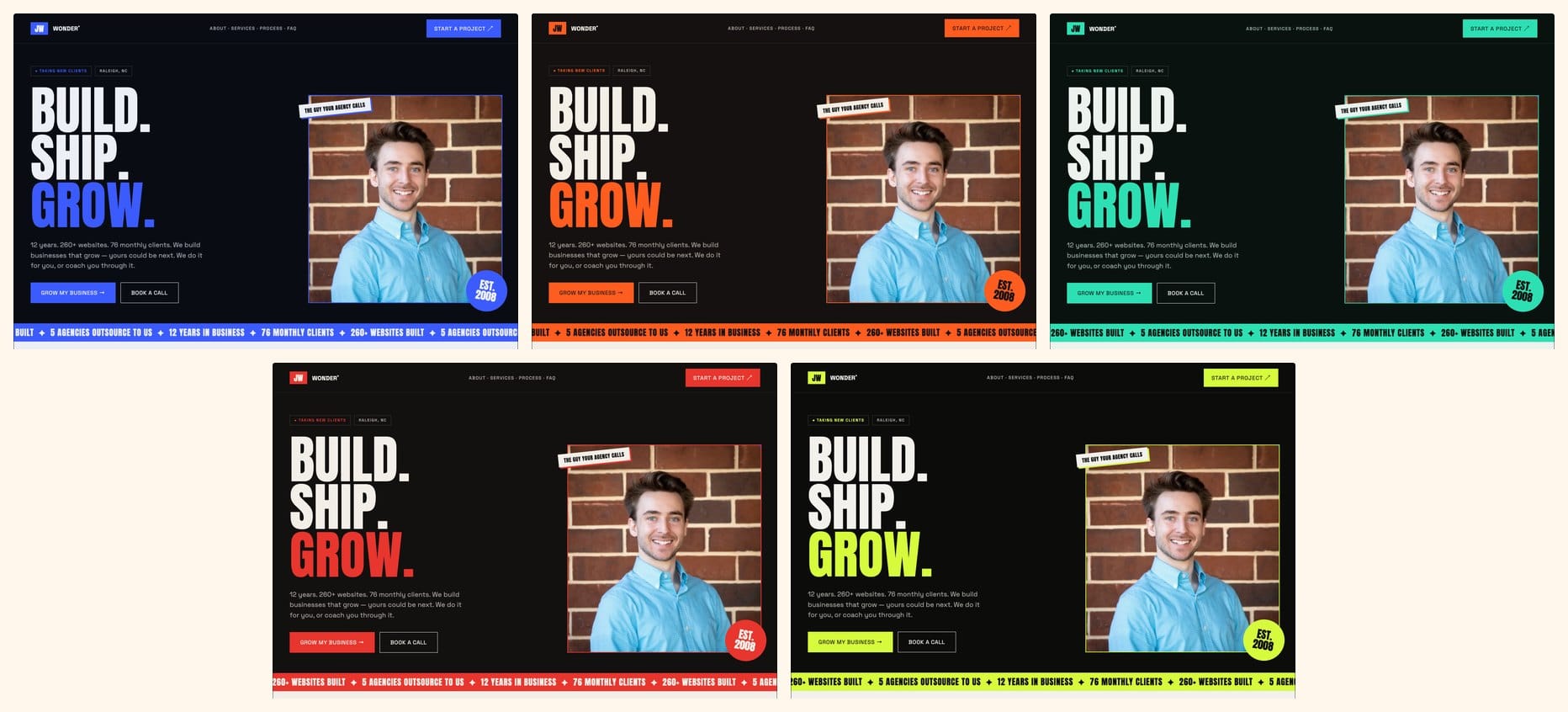
Five versions of one homepage. The tool’s own note said it plainly: same design, four palettes, with only the color changing. We even marked one as the approved direction.
Look at the screenshot above. Every direction has the same three-word headline stacked in tall, condensed capitals. The same photo of me with a sticker on the corner. The same ticker of stats running across the page. The same two buttons. Then the colors change: electric blue, orange, mint, red, and black with acid lime. That last one was labeled “Approved direction” in the file, and for a while I thought it was the one.
It wasn’t wrong. It was loud and confident. But when I imagined a business owner landing on it, it read like a bold agency template with my name dropped in. It could have been anyone’s website. That’s the thing I couldn’t prompt my way out of, no matter how many hours I put in.
Why do AI website designs feel generic?
AI builds the most likely good-looking answer to your prompt. Likely is the opposite of personal, so the results drift toward the middle of everything that already exists.
Researchers have seen the same thing. When the Nielsen Norman Group tested AI prototyping tools, it found that without detailed visual specifications the tools tend to output designs that share a similar, generic look, because AI systems favor common patterns from their training data. When nobody specifies a style, they default to neutral, minimal designs that lack visual identity and emotion.
The same study found that more specific prompts produce much better results, and that matches what I saw. My detailed prompts got much closer than a one-liner would have. But specific facts aren’t the same as a point of view. I could tell the tool everything true about my business, and it would still make the safest, most familiar version of it.
What made the final design feel like me?
I stopped prompting and sketched text ideas on paper. Starting from the words in my own voice gave the design a direction that no prompt had produced.
Paper doesn’t autocomplete. Nothing on a blank page suggests the most likely next move, so the only ideas there are your own. Once I had the words in front of me, I could see the feeling I wanted: plain-spoken and a little playful, warm, and loud where it mattered.
Then I went back into the same AI tool and built it. Same tool, completely different result, because this time I was bringing the direction and the AI was doing the building. I put the design together in Claude Design on the morning of October 2, 2026, and it went live on this site that same day. Here’s where it landed:
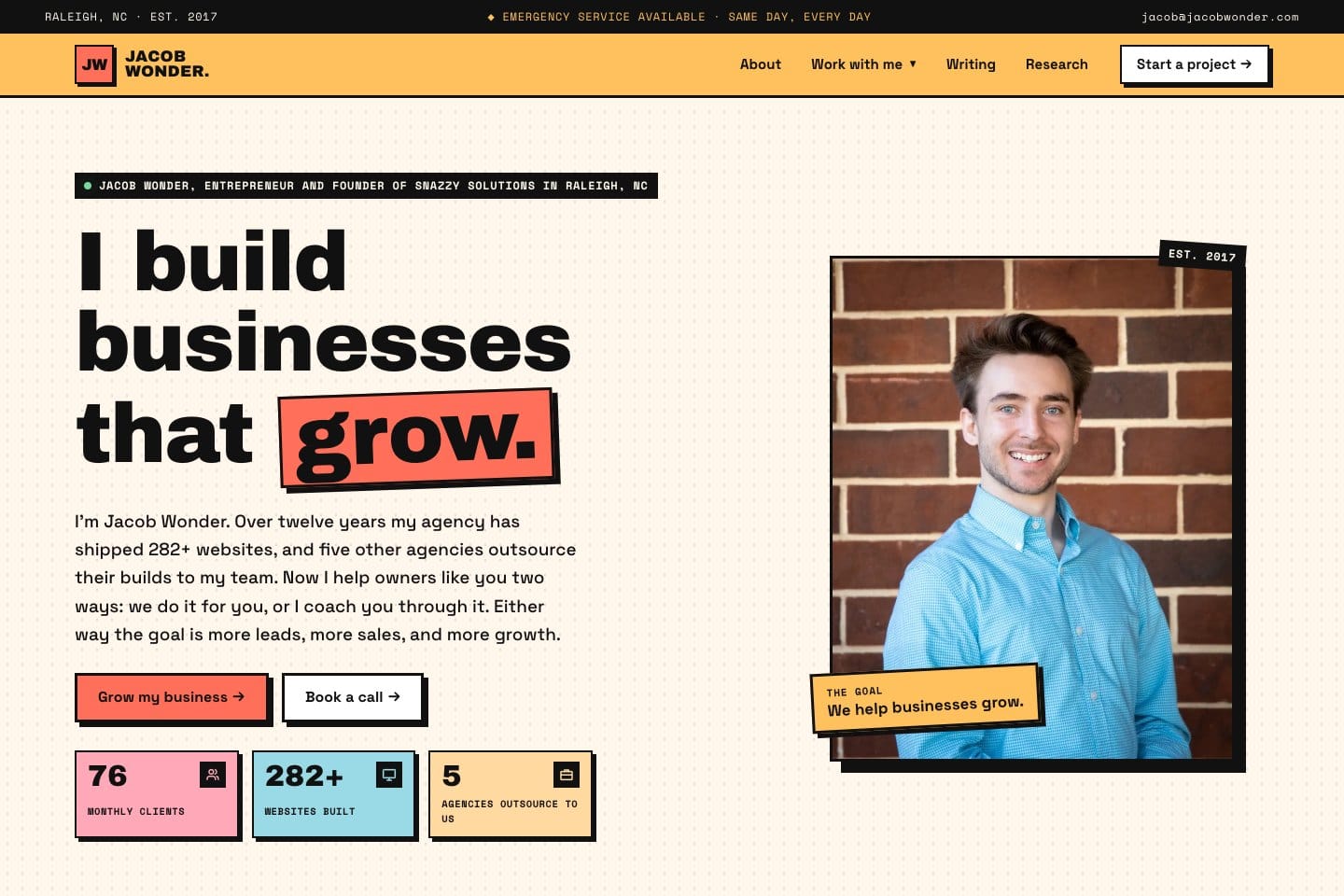
A few choices make it feel like mine. The headline is a full sentence in my own words, with one word stamped on like a sticker. Every card has a thick ink outline and a hard shadow, the way you’d draw a box with a marker. Small labels are set in a typewriter-style font, like notes in a margin. The colors are warm sunset tones on a dotted paper background. None of those choices is rare on its own. Together, they sound like me talking.
Can one design work for two very different websites?
Yes. The same design runs my personal site and Snazzy Sites, the platform my team uses to run client websites. Only the colors and a few settings change.
Snazzy Sites is where my team keeps track of every website we look after: whether each one is healthy, what needs attention, monthly checkups, billing. It’s a working tool, and it uses the exact same look. Same outlines, same hard shadows, same typewriter labels, same dotted texture. The colors switch to Snazzy’s teal and violet.
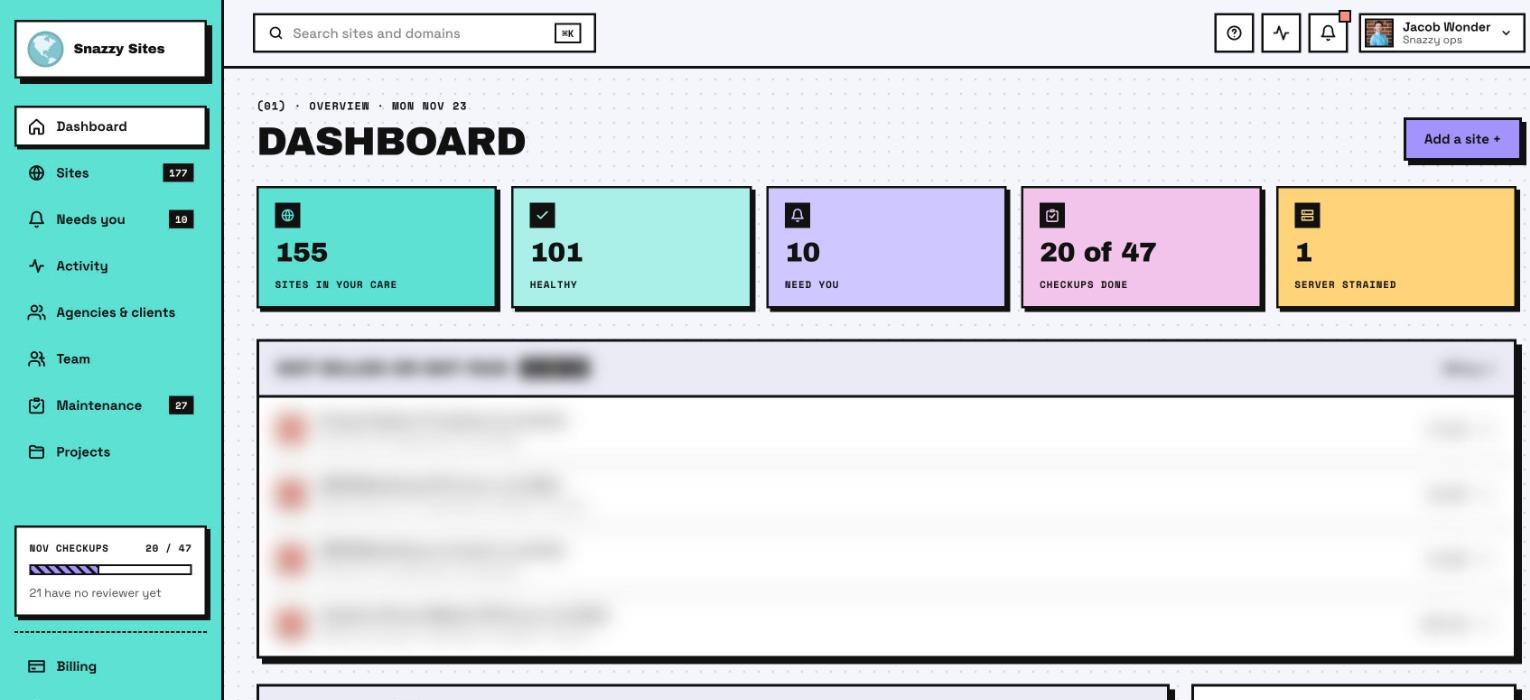
Agencies that work with us use Snazzy Sites too, and each one sees it in their own brand colors. That’s the part I’m proudest of. A look that started as a sketch of how I talk turned out to be a system that can wear somebody else’s brand without falling apart.
How customizable is the design?
Very. Six choices restyle everything: colors, fonts, corners, shadows, edges and texture. Try them on the small copy of my homepage below.
This is the same designer that lives in Snazzy Sites under Settings, Appearance. There, every pick repaints the whole app for that person, on every device they sign in on.
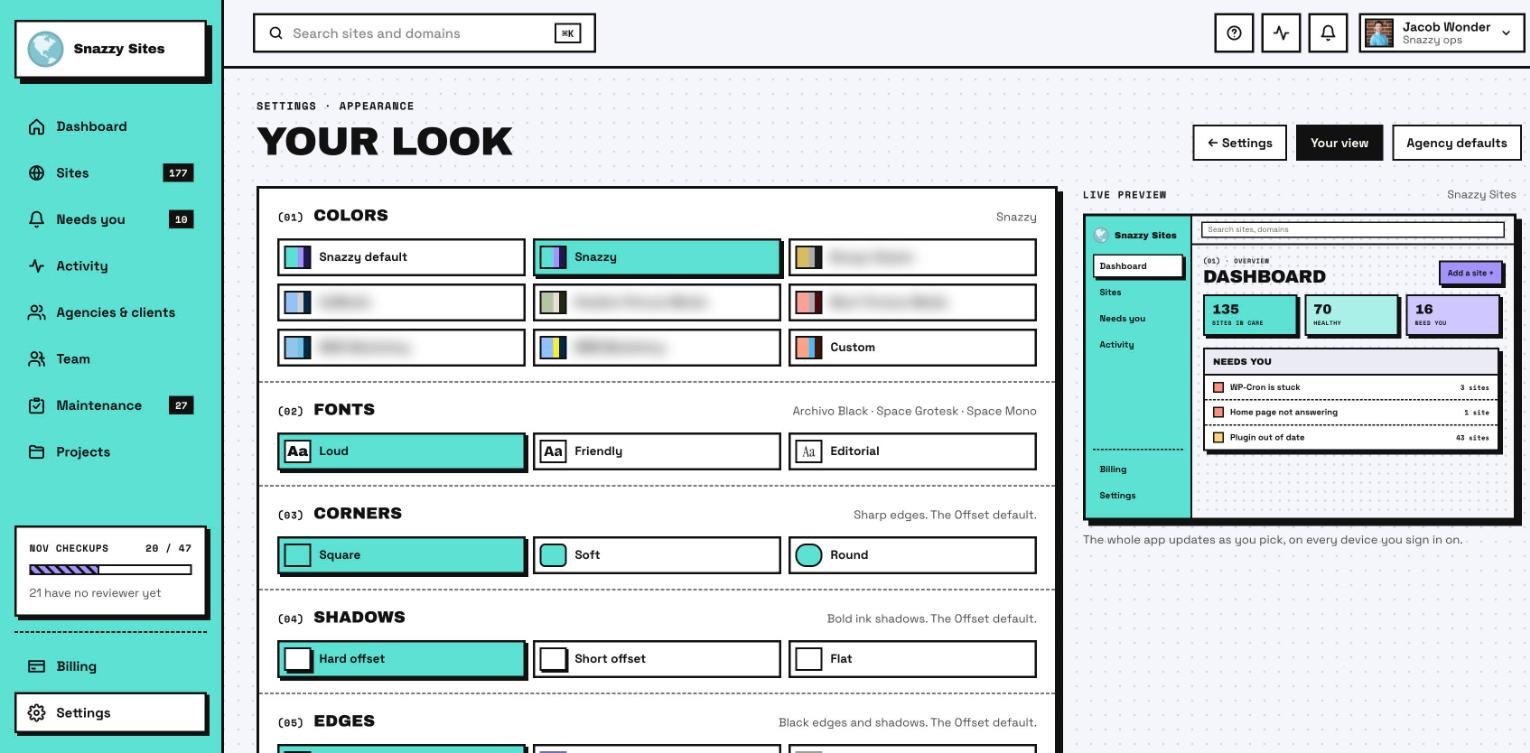
Here’s a working version of it. Pick a color scheme, swap the fonts, round the corners, flatten the shadows. Choose Custom and give it any two colors you like.
WONDER.About · Work with me · WritingStart a project →
With four color schemes and three options for each of the other five settings, that’s 972 different looks before you touch the custom colors. With Custom, you choose a main color and an accent, and the design works out the rest of the palette: lighter fills for the cards, a soft page background, a deep color for the dark band. Each fill is set to a lightness that keeps black text readable, using the OKLCH color model, so even a loud brand color stays legible. That’s how an agency with a gold logo and one with a navy logo both end up with a dashboard that looks like theirs.
The AI directions were five fixed pictures. This is one idea with a lot of room to move.
How should you use AI to design a website?
Bring the direction yourself, then let AI do the building. Decide your words, your tone and one strong idea first. Use AI to explore, produce and polish it quickly.
Here’s the order I’d follow now, after doing it the hard way:
- Write the words first: your headline, how you’d describe what you do to a friend, the phrases you actually use. On paper if you can. The words set the tone, and the look grows out of them.
- Pick one strong idea before you open the tool, so the AI has a direction to follow.
- Give it real content: real numbers, real photos, real testimonials. AI fills gaps with the most generic option it can find, so leave as few gaps as you can.
- Ask for different structures. If every option has the same layout, you’re comparing paint. Ask for directions that differ in layout, type and tone.
- Judge each option by one question: does this sound like me? Polish is easy to get now. Fit is the hard part.
- Have people finish the job. A design is the start. Speed, accessibility, forms, search setup and upkeep still need a team that checks every detail. My team wrote about where AI website development works and where it doesn’t.
My team works this way on client sites now. People decide the direction and sign off on every page. AI is a tool they use to get there faster.
Is web design still worth it in 2026?
Yes, and AI makes the human part matter more. When anyone can generate a decent homepage in minutes, the difference is taste, real content and a site that keeps working.
A generated homepage is a picture of a website. A business needs a website that loads fast, shows up in search, sends leads to the right inbox, and still works after the next plugin update. Most of that happens after launch, which is why I wrote a whole paper on what goes wrong once small-business websites go live.
On the search side, Google has said it judges content on its quality, not on how it was made. Its guidance on AI-generated content says using AI doesn’t give content any special gains, and that what does well is useful, helpful and original. The same goes for design. What matters is whether the site says something real about your business.
If you want a site that feels like yours, my team builds them, and most of our sites launch in 0 to 2 months. Book a call and tell me what you’d write on the paper.
AI website design FAQ
What is the best AI for website design?
The one we used, and still use, is Claude Design. It made complete, polished homepages from a prompt. The best tool matters less than the direction you bring to it.
Can AI design a whole website for me?
It can design the pages. You still need someone to decide what the site should say, build it properly, connect forms and search, and keep it working after launch.
Will AI replace web designers?
Not the good ones. AI makes layouts fast and cheap, which makes the human parts worth more: knowing the business, choosing a direction, and checking every detail before it goes live.
Does an AI-designed website hurt SEO?
No. Google judges pages on quality, not on how they were made. A site ranks when it’s fast, useful and clearly about your business, whoever or whatever designed it.
How long did this redesign take?
The AI directions came from hours of prompting over the summer. Once I had my own direction on paper, I built the final design in a morning and it went live the same day.
Can I get a custom design like this for my business?
Yes. My team designs and builds custom websites that start from how you talk about your business. Book a call and we’ll start there.